Geoprocessing tool reference > Analysis toolbox > Overlay toolset > Tools
Symmetrical Difference (Analysis) (ArcInfo only) |
|
|
Release 9.1
Last modified August 15, 2005 |


Print all topics in : "Tools" |
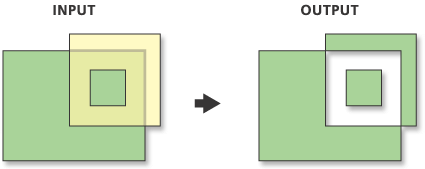
Computes a geometric intersection of the input and update features. Features or portions of features in the input and update features which do not overlap will be written to the Output Feature Class.
Learn more about how Symmetrical Difference works
Illustration
Usage tips
-
The input and difference feature class and feature layer must have polygon geometry.
-
The following environment settings affect this tool: Cluster tolerance, Extent, M domain, Configuration keyword, Coordinate System, Output has M Values, Output Spatial Grid, Output has Z values, Default Z value, Output XY domain, and Output Z domain.
Command line syntax
Introducing geoprocessing methods—Using dialog boxes and the command line
SymDiff_analysis <in_features> <update_features> <out_feature_class> {NO_FID | ONLY_FID | ALL} {cluster_tolerance}
| Parameter | Explanation |
| <in_features> |
The input feature class or layer. Geometry type must be polygon. |
| <update_features> |
The update feature class or layer. Geometry type must be polygon. |
| <out_feature_class> |
The feature class to which the results will be written. |
| {NO_FID | ONLY_FID | ALL} |
Determines which attributes will be transferred to the Output Feature Class.
|
| {cluster_tolerance} |
Cluster tolerance is the distance range in which all vertices and boundaries in a feature class are considered identical or coincident. To minimize error, the cluster tolerance chosen should be as small as possible, depending on the precision level of your data. By default, the minimum possible tolerance value is calculated in the units of the spatial reference of the input. |
Command line example
workspace d:\test_data
symdiff forest\polygon cutzones.shp gdb.mdb\futurecut no_fid 0.25
Scripting syntax
Introducing geoprocessing methods—Running a script
SymDiff_analysis (in_features, update_features, out_feature_class, join_attributes, cluster_tolerance)
| Parameter | Explanation |
| in_features (Required) |
The input feature class or layer. Geometry type must be polygon. |
| update_features (Required) |
The update feature class or layer. Geometry type must be polygon. |
| out_feature_class (Required) |
The feature class to which the results will be written. |
| join_attributes (Optional) |
Determines which attributes will be transferred to the Output Feature Class.
|
| cluster_tolerance (Optional) |
Cluster tolerance is the distance range in which all vertices and boundaries in a feature class are considered identical or coincident. To minimize error, the cluster tolerance chosen should be as small as possible, depending on the precision level of your data. By default, the minimum possible tolerance value is calculated in the units of the spatial reference of the input. |
Script example
# Create the geoprocessor
import win32com.client
gp = win32com.client.Dispatch("esriGeoprocessing.GPDispatch.1")

# Use error trapping in case a problem occurs when running the SymDiff tool
try:
    gp.SymDiff("c:/test_data/covs/forest", "c:/test_data/shp/cutzones.shp", "c:/test_data/gdb.mdb/futurecut", "only_fid" "0.25")
except:
    print gp.GetMessage()