An overview of subtypes and attribute domains |
|
|
Release 9.1
Last modified April 26, 2005 |


|
ArcGIS provides subtypes and attribute domains to help ensure your data is consistent with the system you are modeling.
Tables and feature classes store objects of the same type—that is, objects that have the same behavior and attributes. For example, a feature class called WaterMains may store pressurized water mains. All water mains have the same behavior and have the attributes ReferenceID, Depth, Material, GroundSurfaceType, Size, and PressureRating.
You may be modeling a system in which water mains can only be made of cast iron, ductile iron, or copper. They can only be a certain size based on their type, and there are four possible ground surface types. When you create a new water main object using the editing tools in ArcMap, you may want these attributes to take on certain default values. Similarly, when you use ArcMap to change values for an attribute, you may want to make sure that only legal or valid values are inserted into the attributes for that lateral.
When an object in a feature class or table has valid values for all of its attributes, it is considered a valid object. If one of its attributes contains an invalid value, it is considered an invalid object. When designing your geodatabase, you can specify what makes any particular object in a feature class or table a valid feature by establishing one or more validation rules.
Although all objects in a feature class or table must have the same behavior and attributes, not all objects must share the same attribute domains. For example, it may be true in a water network that only transmission water mains can have a pressure between 40 and 100 psi, while distribution water mains can have a pressure between 50 and 75 psi. You would use an attribute domain to enforce this restriction. To implement this kind of validation rule, you do not have to create separate feature classes for transmission and distribution water mains, but you would want to distinguish these types of water mains from each other to establish a separate set of domains and default values. You can do this using subtypes.
In addition to topology rules, there are four broad classes of validation rules:
- Attribute domains
-
Connectivity Rules
NOTE: ArcInfo and ArcEditor only
-
Relationship rules
NOTE: ArcInfo and ArcEditor only
-
Custom rules
NOTE: ArcInfo and ArcEditor only
When to use subtypes
Feature classes and tables can contain subtypes. An object's subtype is determined by its subtype code value. The subtype code is stored in an integer field in the feature class or table. Each subtype can have its own set of default values and attribute domains for a given field and different connectivity rules associated with it.
An important geodatabase design issue arises when you must decide where it is appropriate to use subtypes and where additional feature classes are required. When you are trying to distinguish objects by their default values, attribute domains, connectivity rules, and relationship rules, it is recommended that you create separate subtypes for a single feature class or table.
When you want to distinguish objects based on different behaviors, attributes, access privileges, or whether the objects are multiversioned, you must create additional feature classes.
Attribute domains are rules that describe the legal values of a field type. Multiple feature classes and tables can share attribute domains stored in the database. Therefore, the water mains feature class can use the same domain for the ground surface type field as a feature class that stores water laterals.
Attribute domains are used to constrain the values allowed in any particular attribute for a table, feature class, or subtype. Each feature class or table has a set of attribute domains that apply to different attributes, subtypes, or both. These attribute domains can be shared across feature classes and tables in a geodatabase.
Attribute domains do not have a property that allows or disallows null values in an associated field. When a table or feature class is created in a geodatabase, each field has a property that indicates whether or not null values are permissible values. The database will not permit null values to be inserted into columns that don't support them. Therefore, all domains treat null values as valid values.
There are two types of attribute domains: range domains and coded value domains. Each domain has a name, a description, and a specific attribute type to which it can apply.
When editing your feature classes and tables, you can enforce these rules by validating individual or sets of objects.
Learn more about editing objects with subtypes and validation rules
Range Domains
A range domain specifies a valid range of values for a numeric attribute. In the water mains example, you could have subtypes transmission, distribution, and bypass water mains. Distribution water mains can have a pressure between 50 and 75 psi. For a distribution water main object to be valid, its pressure value must be some value between 50 and 75 psi. A range domain specifies this range of values.
Coded value domain
A coded value domain can apply to any type of attribute—text, numeric, date, and so on. Coded value domains specify a valid set of values for an attribute. The GroundSurfaceType field on the water mains feature class stores the type of material above the water main. Water mains may be buried under different types of surfaces: pavement, gravel, sand, or none (for exposed water mains). The coded value domain includes both the actual value that is stored in the database (for example, 1 for pavement) and a more user-friendly description of what that value actually means.
Splitting and merging features
Often when editing data, a single feature is split into two features or two separate features are combined, or merged, into a single feature. For example, in a landbase database, a land parcel may be split into two separate land parcels due to rezoning. Similar zoning changes may require two adjacent parcels to be merged into a single parcel.
While the result of these types of edit operations on the feature's geometry is easily predictable, their effects on the attribute values are not. The behavior of an attribute's values when a feature is split is controlled by its split policy. When two features are merged, an attribute's value is controlled by its merge policy.
Each attribute domain has both a split policy and a merge policy. When a feature is split or merged, the ArcInfo system looks to these policies to determine what values the resulting feature or features have for a particular attribute.
Split policies
An attribute for any given table, feature class, or subtype can have one of three split policies that control the value of an attribute in the output object:
- Default value: the attributes of the two resulting features take on the default value for the attribute of the given feature class or subtype.
- Duplicate: the attribute of the two resulting features takes on a copy of the original object's attribute value.
- Geometry ratio: the attributes of resulting features are a ratio of the original feature's value. The ratio is based on the ratio in which the original geometry is divided. If the geometry is divided equally, each new feature's attribute gets one-half of the value of the original object's attribute. Geometry ratio policies only apply to domains for numeric field types.
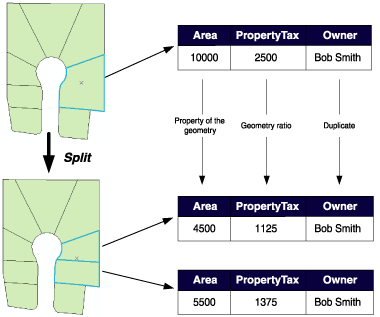
In the parcel example above, when a parcel is split, the Area attribute is automatically assigned as a property of the resulting geometry. The value for Owner is copied to the new objects (in this database, splitting a parcel does not affect its ownership). The PropertyTax is calculated based on the area, or size, of a parcel. To calculate the PropertyTax for each of the new objects, the split policy divides the PropertyTax of the original parcel proportionally among the new features according to their area.
Merge policies
When two features are merged into a single feature, merge policies control the value of attributes in the new feature. An attribute for any given feature class or subtype can have one of three merge policies:
- Default value: the attribute of the resulting feature takes on the default value for the attribute of the given feature class or subtype. This is the only merge policy that applies to nonnumeric fields and coded value domains.
- Sum values: the attribute of the resulting feature takes on the sum of the values from the original features' attribute.
- Geometry weighted: the attribute of the resulting feature is the weighted average of the values of the attribute from the original features. This average is based on the original feature's geometry.
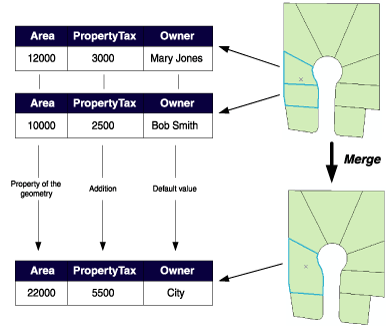
In the parcel example above, when two parcels are merged, the Area attribute is automatically assigned as a property of the resulting geometry. Owner is assigned its default value. As the PropertyTax for the merged feature is the sum of the original features' PropertyTax, its merge policy is to sum the values.
Note that merge policies are not evaluated when merging features in the Editor. However, developers can take advantage of merge policies when writing their own merge implementations.
Schema locking
An exclusive lock is required on a feature class or table to modify its subtypes, default values, and attribute domains.
Learn more about exclusive locks and schema locking