Least cost path and least cost corridor |
|
|
Release 9.1
Last modified April 19, 2005 |


|
The resulting cost-distance and back link rasters from the Cost Distance and Path Distance functions are input for both the Cost Path and Corridor ArcGIS Spatial Analyst functions. These functions return either the least-cost path between sources and destinations or a corridor of the least-cost paths, respectively. The Cost Distance or Path Distance functions must, therefore, be run before using either of these functions.
Learn how to calculate least cost path using the Spatial Analyst toolbar
Learn how to calculate least cost path using the Cost Path tool
Learn how to calculate corridor using the Corridor tool
The Cost Path function determines the path from a destination point to a source. Once you have performed the Cost Distance or Path Distance functions, you can then output the least-cost (or shortest) path from a chosen destination to your source point.
Aside from the destination, the path analysis function uses two rasters derived from the Cost Distance function: the least-cost distance and back link raster. Cost Path uses the back link raster to retrace the least-costly route from the destination to the source over the cost distance surface.
Why find the least-cost path?
The least cost path travels from the destination to the source. This path is one cell wide, travels from the destination to the source, and is guaranteed to be the cheapest route, relative to the cost units defined by the original cost raster that was input into the weighted-distance function. Use the Cost Path function to find the best route for a new road in terms of construction costs or to identify the path to take from several suburban locations (sources) to the closest shopping mall (destination). When applying the function to a road construction example, the resulting path is the cheapest route for constructing a road from the destination to the source (the existing intersection).

You can see two potential paths for the new road in the diagram above (in purple and red). The purple line represents the path created using a cost raster where each input raster (landuse and slope) had the same influence. The red line represents the path created using a cost raster where the slope input raster had a weight (or influence) of 66 percent. By giving the slope input raster a higher weight, more attention was given to avoiding steeper slopes in the red path.
It is important to spend time considering how to weight the rasters that make up the cost raster. How you weight your raster depends on your application and the results you want to achieve.
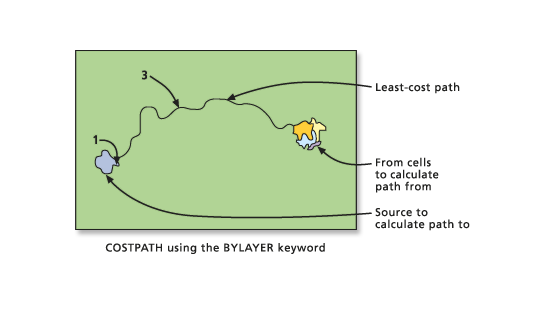
If there are multiple cells or zones as input destinations, the least-cost path can be calculated from each cell (resulting in multiple paths, one path for each cell), each zone (one path from each zone), or by layer (only one path, the cheapest from any zone). A parameter in the function specifies which process should be utilized. In the following example, the Cost Path will be demonstrated by zone.
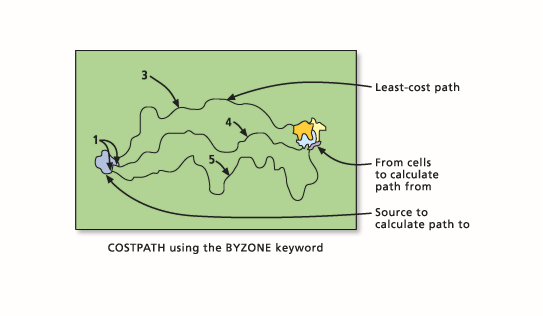
When there is a single least-cost path, it will be coded to the value 3 on the output raster. The cell within the source zone where the path originates is assigned the value 1. In the following example, Cost Path will be demonstrated by layer.
When two or more cost paths from different zones converge on the way to a source and continue the remaining distance together, the joint path to the cell is assigned 2, since the owner of the segment cannot be determined as demonstrated in the example of Cost Path by zone below.
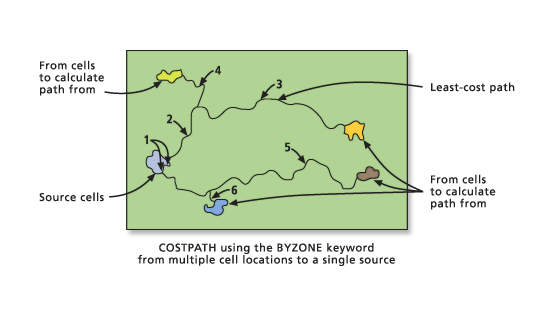
The value assigned to each path is assigned by the order in which the zone cells are encountered in the scanning process.
Least cost corridor
The Corridor function is another member of the cost path family. Instead of returning an output raster with the least-cost paths, Corridor returns a raster in which, for each cell location, the sum of the cost distances (accumulative costs) for two input accumulative cost rasters is calculated. The sum of the two rasters costs identifies for each cell location the least-cost path from one source to another source that passes through the cell location.
You may want to use the Corridor function instead of the Cost Path function when you need to connect two patches of deer habitat in a conservation plan and want to conserve the optimal corridor for the deer instead of just buffering a single path.
To create a corridor, two cost accumulative rasters, one for each source (or set of sources), must be created using Cost Distance (or another cost-surface function that produces an accumulative cost surface). The diagrams that follow show the cost surfaces being created from a single cell location for demonstration purposes. The procedure actually occurs for each cell location on the input rasters.
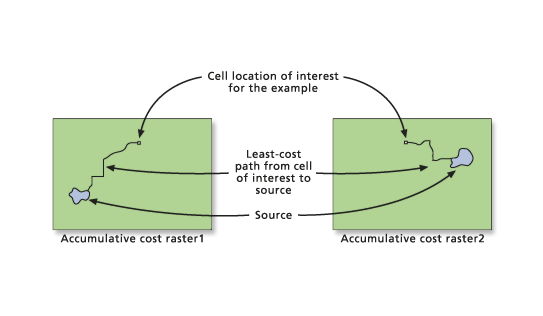
The Corridor function then adds the two accumulative cost surfaces together.
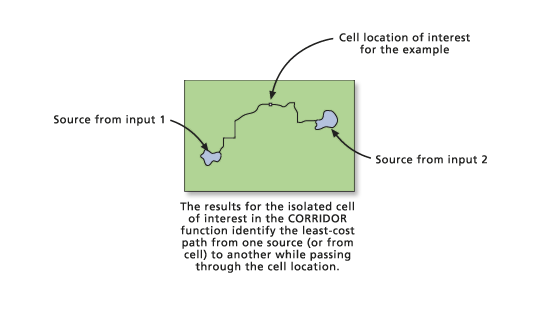
The output raster identifies not a single least-cost path between the two sources but identifies the range of accumulative costs between the sources. That is, the least accumulative cost to reach source 1 plus the least accumulative cost to reach source 2 equals the total accumulative cost of a path passing through a cell. It is the least accumulative cost if a path is routed through the cell to go from source 1 to source 2.
If all cells with values less than a maximum accumulated distance (or threshold) are selected from the corridor raster, then the resulting output raster will correspond to a swath (or corridor) of cells that do not exceed a specified cost. The resultant threshold output raster can be viewed as the least-cost corridor of cells, not the least-cost path (a single line of cells).
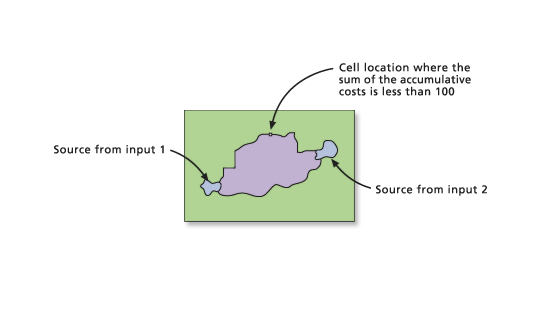
Another way to limit the corridor to a specified threshold is through a conditional instruction (such as the Con function) or a selection function (Select).
out_corr = con(accum_cor < 100, 50, 0)

out_corr = select(accum_cor, 'value < 100')

out_corr = test(accum_cor, 'value < 100')
If multiple sources were input to the Cost Distance function to create the input accumulative cost rasters to the Corridor function, then depending on the accumulative cost values between sources and the threshold specified, multiple corridors might result (one between each of the sources).