Relationship classes in geodatabases(ArcInfo and ArcEditor only) |
|
|
Release 9.1
Last modified August 15, 2005 |


|
- Deciding between relationship classes and joins and relates
- Editing relationships and related objects
- Relationship classes in ArcCatalog
- Relationship classes in ArcMap
- Creating a composite relationship class
- Creating a simple relationship class
- Creating an attributed relationship class
- Creating relationship rules
NOTE: Although you can only view relationship classes in ArcView, they can be both created and edited in ArcInfo and ArcEditor.
Objects in a real-world system, such as a water network or a parcel database, often have particular associations with other objects in the database. For example, in a water network, a valve vault contains water valves. In a parcel database, a parcel has one or many owners.
These kinds of associations between objects in the geodatabase are called relationships. Relationships can exist between spatial objects (features in feature classes), nonspatial objects (rows in a table), or spatial and nonspatial objects. Spatial objects are stored in the geodatabase in feature classes, nonspatial objects are stored in tables, and relationships are stored in relationship classes.
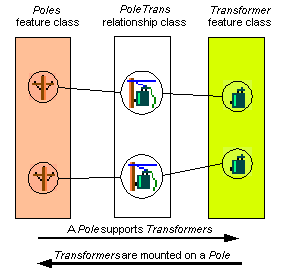
To store relationships, such as between water valves and valve vaults, you must create a relationship class. In your geodatabase, if water valves also have a relationship to valve attribute objects, then a second relationship class is required to store those relationships. The geodatabase supports two kinds of relationships: simple, or peer-to-peer, relationships and composite relationships.
The anatomy of a relationship
Like any association, relationships have particular characteristics, such as cardinality, attributes, and path labels.
Cardinality
One obvious characteristic is the notion of cardinality. Cardinality describes how many objects of type A are related to an object of type B. In the pole–transformer example, a single pole may support more than one transformer, but a transformer can only be mounted on a single pole. The relationship between poles and transformers is one to many: one pole, which is an object in the origin class of the relationship, to many transformers, which are objects in the destination class of the relationship.
View a diagram of cardinalities in relationships
In general, relationships can have one-to-one, one-to-many, many-to-one, and many-to-many cardinalities. Certain types of relationships support certain cardinalities, and you can control cardinalities for any relationship class when you define relationship rules.
Attributes
A relationship between two objects is maintained through attribute values for key fields. In the pole–transformer example, the unit number of the pole that supports the transformer may be included in the attributes of the transformer object. This is an embedded foreign key. It tells you to what object in the pole feature class this particular transformer is related.
View a diagram of attribute values for key fields
Relationship classes can have attributes. Any relationship class that has attributes must be stored as a table in the database and have a pair of foreign keys, each referencing the origin and destination classes of the relationship class. In this case, each relationship is stored as a row in the relationship classes table. Similarly, any many-to-many relationship classes require a table in the database to store at least the foreign keys.
Path labels
Relationship classes have path labels. Forward and backward path labels describe the relationship when navigating from one object to another. The forward path label describes the relationship navigated from the origin class to the destination class; the backward path label describes navigating from the destination to the origin class. In the pole–transformer example above, when navigating from the transformer to the pole, the relationship path label may be "is mounted on". The same relationship, when navigated from the pole to the transformer may have a path label of "supports".
Relationship classes can also be used to propagate standard messages between related objects. Messaging is the mechanism that objects related to each other use to notify each other when they change. For example, in a relationship between poles and transformers, when the pole is deleted, it sends a message to its related transformer objects informing them it was deleted. As transformers can't exist without poles to support them, these transformer objects could respond to the message by deleting themselves.
Simple relationships
Simple or peer-to-peer relationships are relationships between two or more objects in the database that exist independently of each other.
In a relationship between object A and object B, if object A is deleted from the database, object B continues to exist. For example, in a railroad network you may have railroad crossings that have one or more related signal lamps. However, a railroad crossing can exist without a signal lamp, and signal lamps exist on the railroad network where there are no railroad crossings.
Simple relationships can have one-to-one, one-to-many, or many-to-many cardinality.
Learn more about simple relationships
The geodatabase also supports the notion of a composite relationship, where the lifetime of one object controls the lifetime of its related objects. The pole–transformer relationship is an example of a composite relationship. Once a pole is deleted, a delete message is propagated to its related transformers, which are deleted from the transformers' feature class.
Composite relationships are always one-to-many but can be constrained to be one-to-one using relationship rules.
Learn more about composite relationships
One-to-one and one-to-many relationship classes do not require a new table to be created in the geodatabase to store the relationships. However, many-to-many relationship classes do require a new table in the database to store the foreign keys from the origin and destination classes to make the relationship. This table can also have other fields to store attributes of the relationship itself that are not attributed to either the origin or destination class.
For example, in a parcel database you may have a relationship class between parcels and owners in which owners "own" parcels and parcels are "owned by" owners. An attribute of that relationship may be percentage ownership.
One-to-one and one-to-many relationship classes may also have attributes; in this case, a table would be created to store the relationships.
Learn how to create an attributed relationship class
Relationship classes can have an associated set of relationship rules. Relationship rules control which object subtypes from the origin class can be related to which object subtypes in the destination class. They can also be used to specify a valid cardinality range for all permissible subtype pairs.
For example, the subtype wood pole may be able to contain from zero to three transformers, whereas the subtype steel pole may support zero to five transformers. In the first case, the cardinality range would be 0–3; in the second case, it would be 0–5.
You can establish a relationship between two or more objects in the geodatabase by using tools available in ArcMap. Once the relationship is established, use the ArcMap tools in to navigate it and symbolize features based on attributes in a related object. You can find all objects that have a relationship with a particular object through any particular relationship class.
When editing composite features, edits such as move, rotate, and delete also affect the related objects through the relationship class. There is a cost when navigating these relationships. The cost is minimized when indexes are maintained for the primary and foreign keys for the relationship class. When a new relationship class is created with ArcCatalog, the primary and foreign keys are automatically indexed if they do not already have indexes.
It is important to realize that when a feature class participates in a relationship class, that feature class utilizes messaging. When editing that feature class in ArcMap, the related class must be opened so it can respond to the message—either by moving, deleting itself, or implementing some custom behavior. If the related class is not already in the map you are working with, it will automatically be opened to respond to the message, then closed. Each time it responds to a message, it will need to be reopened.
In general, when working with a class in ArcMap, it's a good idea to have all related classes also in the map. This way, the related classes are opened once when they are added to ArcMap. If they are not in the map, then each time you access related objects, the class must be opened.
With many ArcInfo coverage data models, the feature–attribute table contained as few items as possible, and many of the attributes for a feature class were contained in a related table. This can be done with geodatabase feature classes; however, navigating a relationship in the geodatabase is a more costly operation than navigating relates in INFO. In the INFO environment, it was common to store the symbology for a feature in an external related table called a lookup table. This can still be done in the geodatabase using relationship classes; however, for large data, symbolizing this way will be slow, even with indexes on the primary and foreign keys. Try to keep attributes for symbolization on the feature class's table. For performance considerations, it is recommended that symbology information be stored in the feature class.
An exclusive lock is required when modifying a relationship class's relationship rules or when renaming or deleting a relationship class. An exclusive lock can only be acquired for a relationship class if the feature classes or tables that participate in the relationship can also be locked. Therefore, if a user has an exclusive or shared lock on either the origin class, the destination class, or both classes, the properties of the relationship class cannot be edited.
Learn more about exclusive locks and schema locking