Show Navigation
|
Hide Navigation
How PointInterp works |
|
|
Release 9.2
Last modified January 3, 2008 |


|
PointInterp interpolates a surface from point features in a specified neighborhood around each output raster cell using a specified distance weighting function. This means that the influence of a particular point's z-value on the interpolated grid cell value will depend on how far the point is from the cell being interpolated. If the point is outside the neighborhood, it has no influence. If it is inside the neighborhood, its weighted value is calculated using either inverse distance weighted (IDW) interpolation or inverse exponential distance interpolation.
The IDW option of PointInterp is similar to the ArcGIS Spatial Analyst IDW function. The differences between the two are that PointInterp does not have an option to use barriers, and it has different options for choosing which points are used to interpolate each grid cell (the neighborhood). PointInterp also offers smoothing of data points and exponential interpolation, which are not available in other surface interpolation functions.
With the SMOOTH options, the weighting function is modified so as the distance of a point from the grid cell center increases toward the {radius} value, its weight approaches 0. The result is a bell-shaped curve weight function with weight = 1 where distance is 0 and with weight = 0 where distance = {radius}. Without the SMOOTH options, the weight function is always positive.
The formula for calculating the output cell value with the IDW options is:

The formula with the EXP options is:

where the sums are calculated over all points in the neighborhood of the grid cell and:
zi = the z value of a point in the neighborhood.di = the distance from the grid cell center to the point.r = the {radius} of the circular neighborhood for the SMOOTH options.decay = the value of {decay} specified for the IDW options.p = ln2/{decay} for the EXP options.
The parameter p is defined so the weight function has the value 0.5 when di equals the value of {decay}. Thus, for EXP, {decay} represents the distance at which a point's weight is diminished by half compared to a distance of zero. For IDW, {decay} is simply the exponent of the inverse of the point's distance.
When a {plateau} distance greater than zero is used, any distance di less than the {plateau} is replaced by the {plateau} distance in the calculations. The difference between the IDW and exponential weighting methods can be seen in the graphs below.
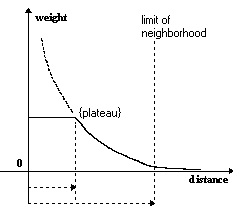
The figure above shows a simplified graph of the nonsmoothed IDW weighting function. The weight is constant from distance 0 to the {plateau} distance. The gray dashed line shows the weight without a {plateau). At the limit of the neighborhood, the weighting function is not 0. With the SMOOTH option, the weighting function would reach 0 exactly at the edge of the neighborhood.
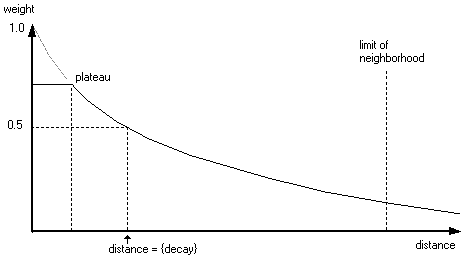
The figure above shows a simplified graph of the nonsmoothed Exp weighting function. The gray dashed line shows the weight without a {plateau}, while the solid line shows the weight with a {plateau}.