Geoprocessing tool reference > Analysis toolbox > Proximity toolset > Tools
Multiple Ring Buffer (Analysis) |
|
|
Release 9.2
Last modified January 13, 2009 |


Print all topics in : "Tools" |
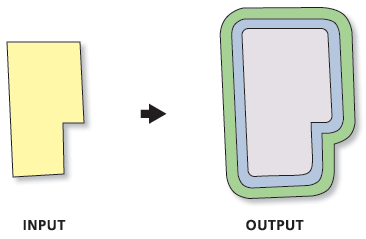
Creates a new feature class of buffer features using a set of buffer distances. The new features may be dissolved using the distance values, or as a set of individual features.
Illustration
Usage tips
-
The tool creates scratch data in the scratch workspace if it is defined in the geoprocessing environment settings; otherwise, it uses the location defined by the TEMP system variable.
-
If Field Name is not set, the default name for the field containing the distance value is "distance". The field type is double.
-
Buffer Unit is not used, if the Input Features has no defined spatial reference.
-
The Buffer tool is used to create buffered features, with each specified distance being a new invocation of the tool. The Calculate Field, Union, and Dissolve tools merge the buffered results to create rings if Dissolve Option is set to ALL. Append is used to aggregate the buffered results if Dissolve Option is set to NONE.
-
The following environments affect this tool: configKeyword, extent, MDomain, outputCoordinateSystem, outputMFlag, outputZFlag, scratchWorkspace, spatialGrid1, spatialGrid2, spatialGrid3, workspace, XYDomain, and ZDomain.
Command line syntax
An overview of the Command Line window
MultipleRingBuffer_analysis <Input_Features> <Output_Feature_class> <Distances;Distances...> {Default | Centimeters | DecimalDegrees | Feet | Inches | Kilometers | Meters | Miles | Millimeters | NauticalMiles | Points | Yards} {Field_Name} {All | None}
| Parameter | Explanation | Data Type |
| <Input_Features> |
The input feature class containing points, lines, or polygons to be buffered. |
Feature Layer |
| <Output_Feature_class> |
The new polygon feature class to be created. |
Feature Class |
| <Distances;Distances...> |
The distances, in ascending size, used to create buffer zones around the Input Features. |
Double |
| {Default | Centimeters | DecimalDegrees | Feet | Inches | Kilometers | Meters | Miles | Millimeters | NauticalMiles | Points | Yards} |
The units used with the Distance values.
If the units are not specified, or entered as 'Default', the units of the Input Features are used (or if the Output Coordinate System environment has been set, its units will be used). |
String |
| {Field_Name} |
The name of the field in the Output Feature Class that will store the buffer distance used to create each feature. If no value is specified, the name will be "distance". The type of the field is double. |
String |
| {All | None} |
|
String |
Command line example
MultipleRingBuffer d:\data.mdb\wapnts\water_points d:\data.mdb\wapnts\waterpnts_buff 100;200;500 buff_dist
Scripting syntax
About getting started with writing geoprocessing scripts
MultipleRingBuffer_analysis (Input_Features, Output_Feature_class, Distances, Buffer_Unit, Field_Name, Dissolve_Option)
| Parameter | Explanation | Data Type |
| Input_Features (Required) |
The input feature class containing points, lines, or polygons to be buffered. |
Feature Layer |
| Output_Feature_class (Required) |
The new polygon feature class to be created. |
Feature Class |
| Distances (Required) |
The distances, in ascending size, used to create buffer zones around the Input Features. |
Double |
| Buffer_Unit (Optional) |
The units used with the Distance values.
If the units are not specified, or entered as 'Default', the units of the Input Features are used (or if the Output Coordinate System environment has been set, its units will be used). |
String |
| Field_Name (Optional) |
The name of the field in the Output Feature Class that will store the buffer distance used to create each feature. If no value is specified, the name will be "distance". The type of the field is double. |
String |
| Dissolve_Option (Optional) |
|
String |
Data types for geoprocessing tool parameters
Script example
# Create the Geoprocessor Object
import arcgisscripting
gp = arcgisscripting.create()

# Define the scratch workspace for the temporary files created by the multiple ring buffer tool
gp.scratchworkspace = "d:\temp"

# Buffer the features
gp.workspace = "d:\data.mdb\wapnts"
gp.multipleringbuffer("water_points", "water_buff", "100;250;500")

# Intersect the buffered features with point feature class to create a
#  new point feature class with the distance values from the results of
#  the multiple ring buffer.
gp.intersect("water_buff;d:\data.mdb\sepnts\structure_point", "struct_by_water")