Geoprocessing tool reference > Data Management toolbox > Generalization toolset > Tools
Eliminate (Data Management) (ArcInfo only) |
|
|
Release 9.2
Last modified November 29, 2010 |


Print all topics in : "Tools" |
Merges the selected polygons with neighboring polygons with the largest shared border or the largest area
Illustration
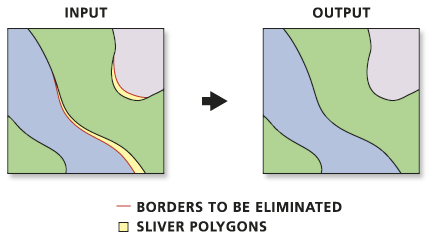
Usage tips
-
Features to be eliminated are determined by a selected feature set applied to a polygon layer. The selected set must be determined in a previous step by using Select Layer by Attribute, using Select Layer by Location, or querying a map layer in ArcMap.
-
Only the selected set of polygons from a temporary feature layer will be eliminated.
-
The following environments affect this tool: configKeyword, extent, MDomain, outputCoordinateSystem, outputMFlag, outputZFlag, outputZValue, scratchWorkspace, spatialGrid1, spatialGrid2, spatialGrid3, workspace, XYDomain, and ZDomain.
Command line syntax
An overview of the Command Line window
Eliminate_management <in_features> <out_feature_class> {LENGTH | AREA}
| Parameter | Explanation | Data Type |
| <in_features> |
The layer whose polygons will be merged into neighboring polygons. |
Feature Layer |
| <out_feature_class> |
The feature class to be created. There should be a smaller number of features than in the input layer. |
Feature Class |
| {LENGTH | AREA} |
These options specify which method will be used for eliminating features.
|
Boolean |
Command line example
eliminate forest final_forest AREA
Scripting syntax
About getting started with writing geoprocessing scripts
Eliminate_management (in_features, out_feature_class, selection)
| Parameter | Explanation | Data Type |
| in_features (Required) |
The layer whose polygons will be merged into neighboring polygons. |
Feature Layer |
| out_feature_class (Required) |
The feature class to be created. There should be a smaller number of features than in the input layer. |
Feature Class |
| selection (Optional) |
These options specify which method will be used for eliminating features.
|
Boolean |
Data types for geoprocessing tool parameters
Script example
# EliminateSlivers.py
# Description: Eliminate all sliver polygons with area less than 10 square meters.
# Author: ESRI
# Date: 1/1/04

# Create the Geoprocessor object
import arcgisscripting, sys, string, os
gp = arcgisscripting.create()

myWorkspace = "c:/data/region.mdb"
myFeatures = "forest_area"

try:
    # Set the workspace (to avoid having to type in the full path to the data every time)
    gp.Workspace = MyWorkspace

    # Process: Make feature layer
    gp.MakeLayer_management(myFeatures, "eliminateLYR", "", "", "GRID_CODE GRID_CODE VISIBLE;geocompID geocompID VISIBLE;Shape_Length Shape_Length VISIBLE;Shape_Area Shape_Area VISIBLE")

    # Process: Select features from layer to be eliminated
    gp.SelectLayerByAttribute_management("eliminateLYR", "NEW_SELECTION", "[Shape_Area] < 10")

    # Process: Eliminate selected features into neighboring polygons with the largest shared border
    gp.Eliminate_management("eliminateLYR", myFeatures + "_out", "LENGTH")

except:
    # If an error occurred while running a tool print the messages
    print gp.GetMessages()