Editing and data compilation > Creating new features
Creating a fillet curve between two lines |
|
|
Release 9.2
Last modified August 17, 2007 |


Print all topics in : "Creating new features" |
About creating a fillet curve between two lines
Fillets are segments of a circular arc that are often used to connect two intersecting lines. Fillets are used to create smoothly curving connections between lines, such as edge of pavement lines at street intersections or rounded corners on parcel features.
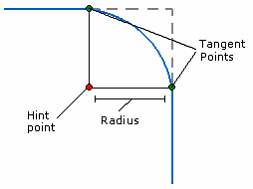
The Fillet tool  creates a circular curve that is tangential to two line segments and optionally trims the overlapping segments from the original feature or features.
The curve is constructed using an implied or fixed radius value through the tangent points that are derived from a hint point, which is the mouse pointer location. It determines the region used to define the curve direction.
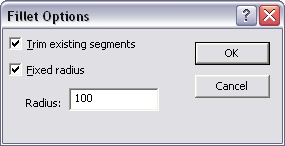
Press the O key to set the Fillet tool options. The options include whether or not to trim the existing features and use a fixed radius value.
How to create a fillet curve between two lines
- Click the Fillet tool on the Advanced Editing toolbar.
- Optionally, press O to set the Fillet Options.
Check Trim existing segments if you want to remove the existing segments that extend beyond the tangent points. - Click one line first, then the other, to specify the lines between which you want to construct the fillet.
- When the curve looks like it has the correct radius, click to finish the curve.
A new fillet curve joins the two selected lines. The extra line segments outside the curve are trimmed off if you checked Trim existing segments.
Check Fixed radius and type a radius for the curve.
Press Enter or click OK.
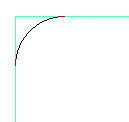
Without a fixed radius, the fillet curve changes as you drag the pointer away from the first line you clicked.
| Tip |
|