Geoprocessing > Automating your work with models > Model Iteration
An overview of model iteration |
|
|
Release 9.2
Last modified November 9, 2006 |


Print all topics in : "Model Iteration" |
Iteration means to repeat a process and is sometimes referred to as looping. Iteration is a key concept in most programming languages. With iteration, you execute a process over and over using different data in each iteration.
In ModelBuilder, you can use iteration to cause the entire model to iterate, or just iterate an individual process.
Batch processing is one way to iterate an entire model using different data for each iteration. With batch processing, you use the batch grid to provide data and values for every model parameter for each iteration of the model.
Learn more about batch processing and the batch grid
Batch processing is available from ArcToolbox but not within ModelBuilder. In ModelBuilder, you can use several methods to cause a process or model to iterate. These methods are described in general below. The subtopics that follow show you the mechanics of declaring Lists and Series, setting up a model for iteration, iteration variables, and feedback.
-
Lists: You can declare one or more variables as a List variable. Once you declare a variable as a List, opening that variable will display the batch grid where you enter the values for the variable. Once the List variable is connected to a tool, that tool and all downstream processes (the processes that depend on the output of the tool) will execute once for each value in the List.
Learn more about iteration using Lists
Series: You can declare one or more variables a Series variable. A Series is similar to a List in that it contains multiple values. Where a Series differs from a List is that the entire model is executed once for each value in Series. You can have multiple Series variables in your model, but you can only declare one control model iteration.
Learn more about iteration using Series
Boolean condition: You can instruct a model to iterate until a value variable is false. You can use a Boolean or a Long variable. If you use a Long variable, a negative or zero value is considered false. All positive values are consider true.
Count: You can instruct the model to iterate a certain number of times.
Learn more about iteration using a count or Boolean condition
Feedback: Feedback is where the output of a process is made the input to an earlier process.
Learn more about iteration using feedback
Declaring Lists and Series
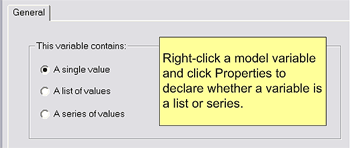
In ModelBuilder, right-click any variable and click Properties. Click the appropriate button to declare the variable as either A single value (the default), A list of values, or A series of values.
Setting up a model for iteration using a count or Boolean condition
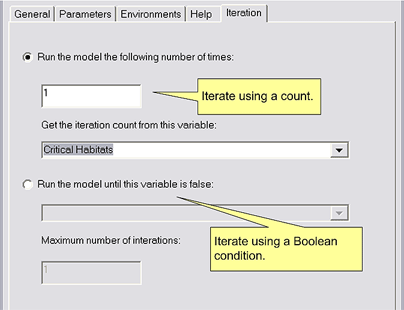
From the Model menu in ModelBuilder, click Model Properties and click the Iteration tab. Here is where you specify that you want the entire model to iterate using a count or Boolean condition.
Feedback
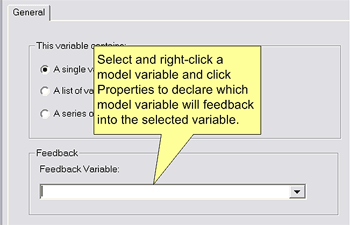
Feedback is where the output of a process is made the input to an earlier process. You can declare a variable as feedback by opening the properties of the input variable and selecting the output variable that will feed back as the input, as shown below. You can also use the Connect tool  and connect an output variable to feed back to an input variable.
Iteration variables
ModelBuilder provides two variables that contain the current iteration number and the current list index.
%i%— the current position, or index, in a list variable. The first position is zero.
%n%— the current model iteration. The first iteration is zero.
You can use these variables in calculations and pathnames. For example, the pathname of an output dataset might be:
E:/Data/Result%i%_%n%