Show Navigation
|
Hide Navigation
You are here:
Geoprocessing tool reference > 3D Analyst toolbox > Raster Interpolation toolset
Geoprocessing tool reference > 3D Analyst toolbox > Raster Interpolation toolset
Understanding raster interpolation |
|
|
Release 9.2
Last modified November 22, 2006 |


Print all topics in : "Raster Interpolation toolset" |
Related Topics
Interpolation predicts values for cells in a raster from a limited number of sample data points. It can be used to predict unknown values for any geographic point data: elevation, rainfall, chemical concentrations, noise levels, and so on.
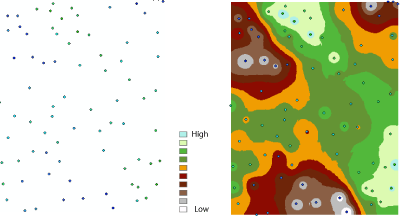
The illustration on the left shows a point dataset of known rainfall-level values. The illustration on the right shows a raster interpolated from these points. Unknown values are predicted with a mathematical formula that uses the values of nearby known points.
Why interpolate to raster?
The assumption that makes interpolation a viable option is that spatially distributed objects are spatially correlated; in other words, things that are close together tend to have similar characteristics. For instance, if it is raining on one side of the street, you can predict with a high level of confidence that it is also raining on the other side of the street. You would be less certain if it was raining across town and less confident still about the state of the weather in the next county.
Using the previous analogy, it is easy to see that the values of points close to sampled points are more likely to be similar than those that are farther apart. This is the basis of interpolation. A typical use for point interpolation is to create an elevation surface from a set of sample measurements.
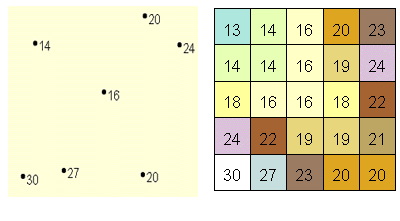
In the following illustration, each symbol in the point layer represents a location where the elevation has been measured. By interpolating, the values between these input points will be predicted.