Mapping and visualization > An overview of mapping and visualization
ArcMap application patterns |
|
|
Release 9.3
Last modified July 28, 2009 |


Print all topics in : "An overview of mapping and visualization" |
The types of map applications that you build in ArcMap can define some common patterns for how the map layers are organized in the map's table of contents.
You can use ArcMap to
- Create map layouts for printing and export as PostScript, PDF, and other electronic documents.
- Create, edit, and maintain geographic data.
- Perform geoprocessing and analysis.
- Explore, evaluate, interpret, visualize, compare, and summarize results generated through analysis. Results are typically presented as additional operational map layers.
- Organize a large collection of data holdings for a project, workgroup, or enterprise. By visualizing their data in ArcMap, users can begin to organize their contents into logical map layers, datasets, and collections.
- Create basemap services to be published and served using ArcGIS Server.
- Generate map documents that can be used to work with operational map layers. For example, you can publish and interact with map layers that are derived as results from various geoprocessing, analytic, and query operations. These are often mashed up with Google Maps, Google Earth, Microsoft Virtual Earth, ArcGIS Online services, or your own GIS basemaps.
- Create map documents to be published using ArcReader
As an ArcMap user, you will create various types of ArcMap documents to support these and many other workflows. The type of map that you create will influence how you organize your map layers in the table of contents and in how you define the tools used to work with each map layer.
Here are a few examples of use patterns that you may end up using in your applications and the corresponding organization of each map's table of contents.
Using an ArcMap document with independent map layers
Traditionally, ArcMap documents have provided a framework for performing GIS work, such as data editing and compilation. Most ArcGIS users think of their maps in ArcMap, ArcGlobe, and ArcScene as a set of independent map layers. The map document itself acts as the framework for organizing a large collection of geographic datasets. Most users follow this approach in almost all of their ArcMap use cases.
Each map document is based upon a series of map layers that you add to your map document. Some of the map layers will provide a base or framework on which you perform your work. Other layers will provide the features that you want to work with or operate on. For example, editors would edit target features using tools specific to the particular features that they are editing (e.g., line editing for lines and polygon boundaries, attribute tools for updating feature attributes, network editing tools for updating a geometric network such as an electrical facilities layer, and so on).
In these maps, each map layer is typically managed independently of other layers in the table of contents.
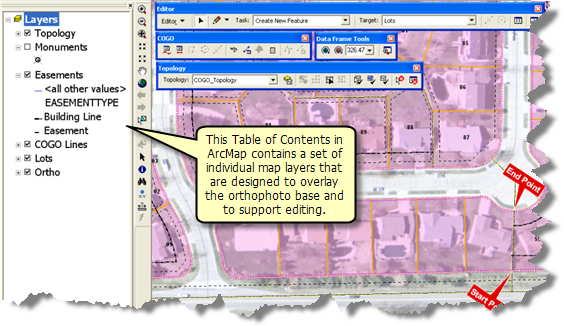
Most ArcMap users add individual map layers to their documents and think of them as independent map layers that can be overlaid in ArcGIS such as this editing example.
Frequently, the information is organized into a series of map layers that represent a basemap and a set of operational layers that you work with using tools and tasks. For example, orthoimagery is often used as a basemap layer. Also, in a utility map, your basemap is a land base, and you edit elements in your facilities network on top of the land base.
Using geoprocessing tool layers
Many users create maps that are used to host geoprocessing and analysis operations. These maps typically include background information that provides a locational or geographic context plus additional map layers that are used as inputs in the modeling process. When geoprocessing operations are executed, new map layers are added that help you to display and work with the results of analytic models.
Some analytic maps contain tool layers. These are map layers that hold the geoprocessing model, any related input map layers, and the results of the analytic operations.
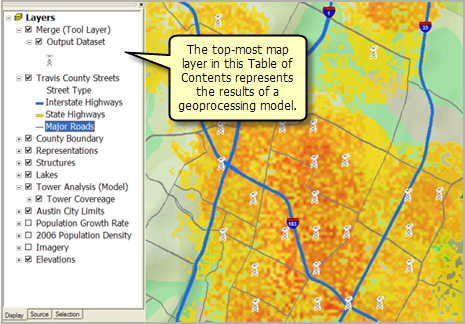
Tool layers are used to execute geoprocessing models and scripts as tasks in your map. The results are saved and displayed as sublayers of the tool layer.
See An overview of tool layers for more information.
Working with result layers in your map
In many GIS workflows, a map is used to present and work with result layers. Many users want to publish the results of models, queries, sensor feeds, simulations, and other work tasks. It is often important to think about how you want to work with these results.
These maps also typically include a series of tools that enable users to understand, visualize, analyze, and compare their results. For example, the tools for working with resulting map layers might need to include statistical graphing and charting tools, reporting tools, HTML pop-ups, and so on.
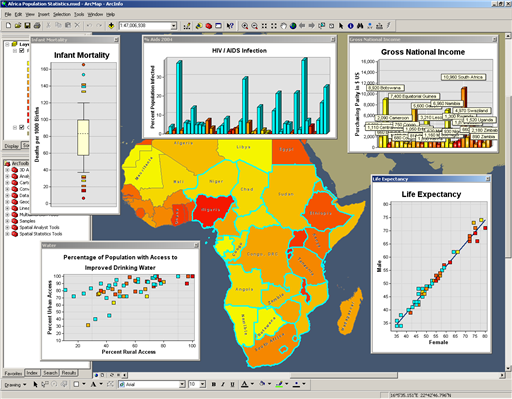
In this application, the map of Africa becomes an interface for accessing and visualizing a series of information about the populations of each country, level of AIDS infections, and other population characteristics. The tools used to visualize and interact with this information is as much a part of the map layer as the map display is.
For more information on working with result layers in ArcGIS, see the help topic named Building operational map layers. This topic covers working with results in Web applications, but a similar use case can be applied in ArcMap.
Using the map's table of contents to thematically organize information
A map document can provide a framework for thematically organizing a large collection of geographic datasets. For many large projects, one of the initial steps is to collect, collate, and organize a large collection of datasets for a study area. For example, you can generate map layers for all datasets and by viewing them and understanding their content, you can subsequently begin to organize these individual layers into theme-based group layers in your table of contents.
Displaying your content within maps can help you start to understand how to organize all your individual datasets into a more cohesive whole—often as a set of information themes. Map views help you to synthesize these into a more meaningful information system that helps users to find information to support their work.
Many large GIS organizations use similar map documents for providing public access to their GIS data holdings.
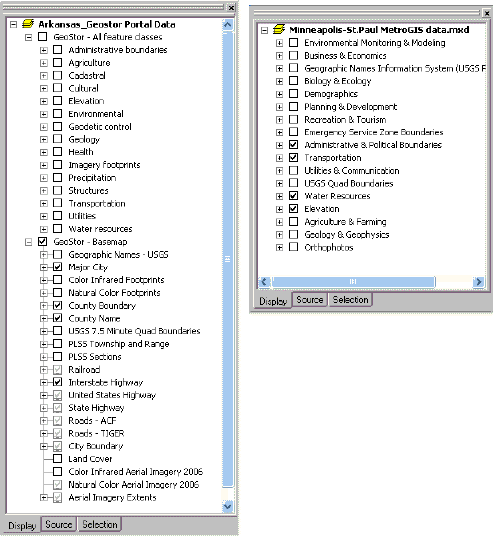
The theme-based organization of the data at two GIS Web sites - one for the state of Arkansas and the other for local governments in Minneapolis-St Paul, MN. The map layers published at these Web sites are organized thematically.
See Using group layers to organize map layers for more information.
Building an ArcGIS Server cached map service
Many users create map documents that are used to generate ArcGIS Server cached map services, primarily for use as basemap services.
ArcGIS Server map caches are used to build GIS basemaps. These are much like many web maps that integrate a number of map layers into a single, unified map view. For GIS, these maps provide a framework or context on which operational information is displayed and worked with.
It's typical that these maps are designed for use at multiple map scales. This is essentially designing a series of maps—one for each scale range that portrays the content in an appropriate way for each map scale.
The tables of contents for these maps organize all the map layers for a given map scale into a single group layer (i.e., for generating a unified view). In addition, each basemap may have a single layer or two (such as place-names and transportation) that you can toggle on and off.
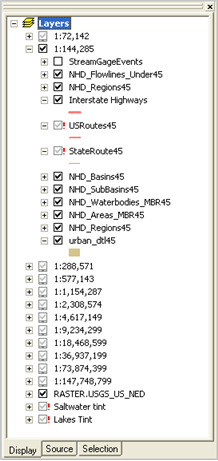
Cached map services typically are designed as maps that draw at multiple map scales. The ArcMap documents for these maps organize the set of map layers for each supported map scale into a group layer for that map scale.
The use of a basemap in your GIS maps creates a simpler and more efficient user experience. As the GIS professional, your job may include generating basemaps with behavior similar to Google Earth and Virtual Earth. For example, as you zoom in and out, the map can portray itself appropriately across the range of supported map scales.
See How to build online basemaps for more information.
Building operational map layers
Many users want to publish Web map services that are used to serve operational map layers using ArcGIS Server. Many maps present status maps or a common operational picture. It's often important to generate a series of map layers that present observations, sensor feeds, or query results of features that match particular criteria. These map layers can be served with tools focused on visualizing and summarizing the status of a situation often coupled with tools that help you to identify important patterns.

Example of an operational layer for stream gauges along the Neuse River system in North Carolina. The gauging stations provide access to real-time and historical stream flow measurements at each station. The flow values for a selected gauging station are displayed in the graph for a two-month time window.
See the help topic named A framework for Web GIS map applications for more information about the elements of web maps and Building operational map layers for options on how they can be created and published.
If you are ready to begin publishing operational layers using ArcMap, consider using optimized map services to get good performance and scalability.
Creating map layers to mash up with ArcGIS Online services
ArcGIS Online provides a set of multiscale, high-performance basemap services that include imagery, transportation, topographic maps, and so on. It's easy for ArcGIS users to overlay their own data on top of the ArcGIS Online 2D and 3D map services.
There are at least three common ways in which you can use ArcGIS Online basemaps:
- You can simply add ArcGIS Online maps or imagery as a basemap layer in your ArcMap or ArcGlobe documents (as well as in ArcGIS Explorer). Then add you own local data on top.
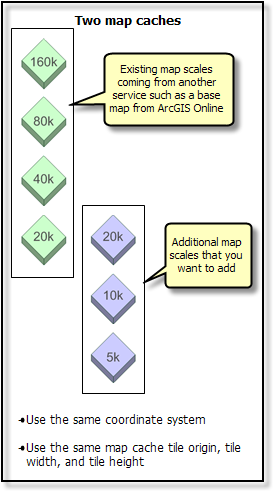
- You can extend basemaps from ArcGIS Online services with your own more detailed, up-to-date content for your area of interest. This is done by using ArcGIS Online services for the more generalized map scales in your basemap and extending these by adding your own more focused content for use at larger map scales. For example, in a local government, chances are that you have more detailed and up-to-date imagery for your urban areas.
The ability to extend ArcGIS Online basemaps is one of the goals for ArcGIS Online maps and data services.
Here is an example of an existing multiscale map cache, shown in green, and how you can think about adding your own map cache for your organization's work, shown in blue. There is one overlapping map scale, but essentially, your maps take over at larger map scales. This same concept can be used to extend any ArcGIS Online basemap.
- You can mash up operational map services. The ArcGIS Server REST API and JavaScript interface make it easy to script out and deploy mashups that fuse multiple services such as is shown in the two hydrologic applications shown below.
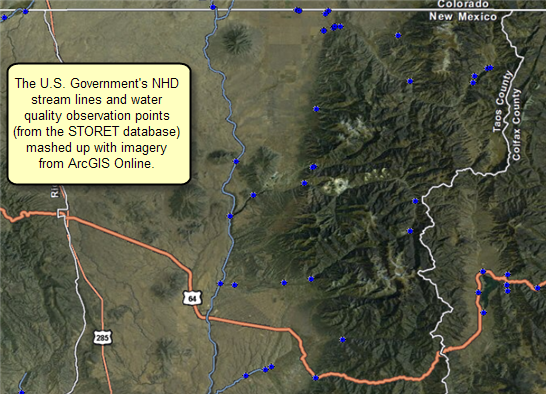
Stream lines and other water quality observation points masued up with image services from ArcGIS Online.
GIS users will often define the set of tools and operations that will be used to work with their operational map services. In the example application below, users have mashed up stream gauge locations to query and graph stream flows for certain time periods.
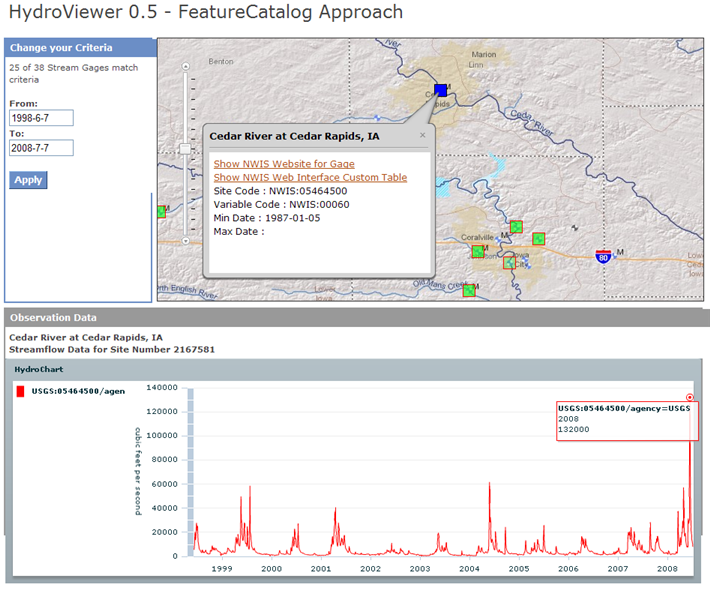
Source: National Water Information System (NWIS) stream gauge network managed by USGS and other government agencies (http://waterdata.usgs.gov/nwis).
See Using ArcGIS Online Web maps for mashups for more information.
Creating map layers to mash up with Google and Microsoft
Many users want to create maps using ArcGIS that can be mashed up with Google Earth™, Google Maps™, or Microsoft Virtual Earth™. Many maps created in ArcMap display results or status maps that you want to mash up with consumer- and browser-based map applications. A common capability is to include feature identification tools that pop-up HTML information displays.
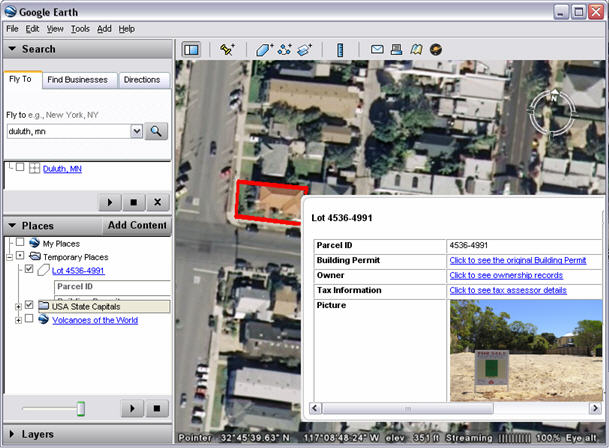
Image courtesy of Google Earth. Example of an HTML information pop-up for features served from ArcGIS using KML.
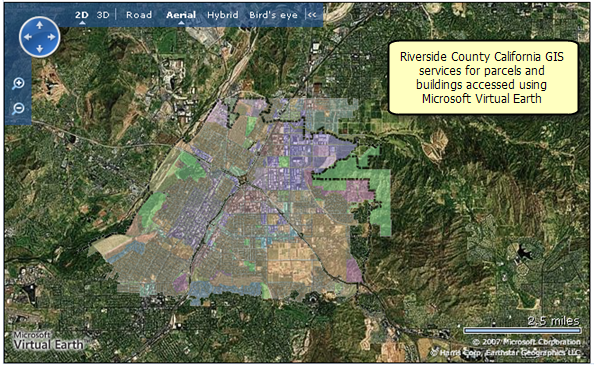
Image courtesy of Microsoft Virtual Earth. ArcGIS data is mashed up on the Microsoft Virtual Earth basemap.
See Using existing Web maps for mashups for more information.