Show Navigation
|
Hide Navigation
You are here:
Extensions > Maplex > Label Positions for Polygons
Extensions > Maplex > Label Positions for Polygons
Placing polygon labels for rivers |
|
|
Release 9.3
Last modified January 9, 2009 |


Print all topics in : "Label Positions for Polygons" |
Related Topics
About placing polygon labels for rivers
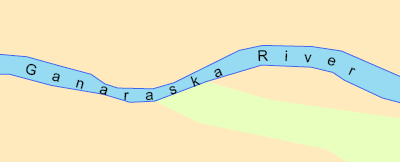
Some rivers are symbolized with a polygon feature due to their width. These rivers are special features that have many curves and tight bends that are not easily labeled without seeming cramped. River labeling generalizes the trend line for the turns of the polygon river and places the label following that smoother line. River labeling also allows the label to be placed following more than one bend.
There are two placement positions for polygon river features: Curved and Offset Curved.
Learn more about setting a label offset.
How to place polygon labels for rivers
- Click the Label Manager button
 on the Labeling toolbar.
- Check the box next to the layer you want to label.
- Choose a label class under the layer.
- Click the Properties button.
- Click the Label Position tab.
- Choose River Placement from the drop-down list.
The label position may change when you choose the River Placement style. This is because there are two placement positions for contour features: Curved and Offset Curved. - Click OK to close all dialog boxes.
| Tip |
|