Extensions > PLTS > Validating data with GIS Data ReViewer > Configuring checks
Finding multipart line features |
|
|
Release 9.3
Last modified February 2, 2012 |


Print all topics in : "Configuring checks" |
About multipart line features
Multipart line features are those that have two or more paths. A discontinuous road that is one polyline feature is an example of a multipart feature. The geodatabase allows for multipart polylines, but some data models do not.
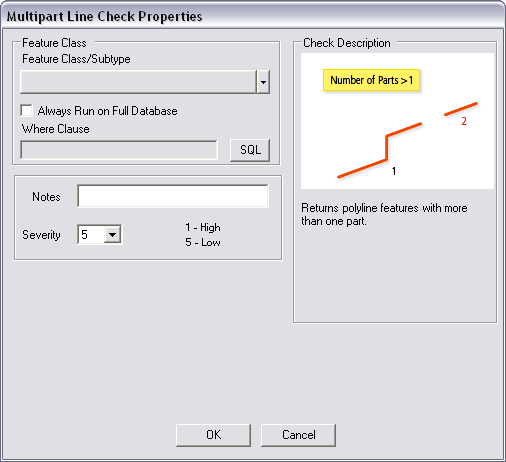
The check can be run on an entire feature class, a subtype, or a set of features selected using a SQL query.
Once you have defined the criteria for the check, you can configure the notes and a severity rating. The notes allow you to provide a more specific description for the feature that has been written to the ReViewer table and are copied to the Notes field in the ReViewer table. The severity rating allows you to indicate how important the results from a check are in terms of your quality assurance/quality control processes. The lower the number, the greater the priority the check's results have.
How to find multipart line features
- Click the drop-down arrow on the PLTS GIS Data ReViewer toolbar, click the plus sign next to Default Checks, then click Multipart Line Check.
The Multipart Line Check Properties dialog box appears. - Click the Feature Class/Subtype drop-down arrow and choose the feature class and subtype on which to run the check.
- To run the check on the entire feature class and save this setting, check the Always Run on Full Database check box.
- To run the check on specific features in a feature class, click SQL to construct a SQL query.
- If necessary, type descriptive text for the check results in the Notes text box.
- If necessary, click the Severity drop-down arrow and choose a value that indicates the priority of the check's results.
- Click OK.
- Click the Run Data Check button
 on the PLTS GIS Data ReViewer toolbar.
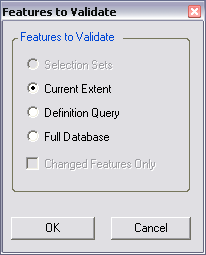
The Features to Validate dialog box appears. - Choose an option in the Features to Validate area.
- To run the check only on features that have been edited, check the Changed Features Only check box.
- Click OK.