Editing and data compilation > Getting started with editing
About setting distance units |
|
|
Release 9.3
Last modified May 14, 2009 |


Print all topics in : "Getting started with editing" |
Note:
This topic was updated for 9.3.1.
The map units are the units in which the spatial data in the data frame is drawn. Map units are determined by the coordinate system of the data frame. When editing in ArcMap, all the values you enter will be in map units by default. You can find out the map units used by your coordinate system on the Data Frame Properties dialog box General tab.
Sometimes when creating features using the editing tools in ArcMap, you need to enter values that were recorded in different distance units than the coordinate system of your data.
For example, suppose your data is in a state plane coordinate system and the linear units are U.S. survey feet (1 Foot_US = 0.3048006096 m). You are given measurements in international feet (1 Foot = 0.3048 m). Rather than convert all the measurements, you can type the abbreviation for international foot, "ft", after the measurements, and the tools will convert the distance correctly. You could also change the dataset coordinate system definition to use international feet and type the distances without a unit suffix.
Whenever you are typing a distance into one of the editing tools, you have the option to specify the linear units or simply type a number, which the tool will interpret as being in the dataset's coordinate system units. Distance unit abbreviations only work when your data frame is projected—in other words, your data frame must use a projected coordinate system rather than a geographic coordinate system.
The following sections outline all the distance units supported in ArcMap and describe how to implement them.
Metric units
| Distance units | Abbreviation | Meters per unit | Description |
| Kilometer | km | 1,000 | 1,000 meters exactly |
| Meter | m | 1 | International meter |
| Centimeter | cm | .01 | 1/100 meter exactly |
| Millimeter | mm | 0.001 | 1/1000 meter exactly |
Imperial or international units
| Distance units | Abbreviation | Meters per unit | Description |
| Foot | ft | 0.3048 | Standard foot used in the United States. Also known as international foot or imperial foot that was used in most non-U.S. countries before the metric system. |
| Mile | mi | 1,609.344 | Also referred to as a statute mile, equal to 5,280 international feet. |
|
Nautical
mile |
nm | 1,852 | The nautical mile is a unit of distance used primarily in sea and aviation. The nautical mile is defined as the average distance on the earth's surface represented by one minute of latitude. In 1929, the nautical mile was defined as exactly 1,852 meters, or 6,076.11549 feet, a distance known as the international nautical mile. |
| Chain | ch | 20.1168 | 66 international feet. |
| Yard | yd | 0.9144 | Three international feet. |
| Rod | rd | 5.0292 | 1/4 chain, or 16.5 international feet. |
| Link | lk | 0.201168 | 1/100 international chain, or 66/100 international feet. |
| Inch | in | 0.0254 | 1/12 international foot. |
U.S. survey units
| Distance units | Abbreviation | Meters per unit | Description |
|
Survey
foot |
ftUS | 0.3048006096 | The U.S. survey foot is used in the state plane coordinate systems. In the United States, fundamental survey units such as rods, chains, statute miles, acres, sections, and townships all depend on the U.S. survey foot. An exact conversion to meters can be accomplished by multiplying U.S. survey feet by the fraction 1,200/3,937. |
|
Survey
mile |
miUS | 1,609.3472186944 | 5,280 survey feet |
|
Survey
chain |
chUS | 20.1168402337 | 66 survey feet |
|
Survey
rod |
rdUS | 5.0292100584 | 1/4 survey chain |
|
Survey
link |
lkUS | 0.2011684023 | 1/100 survey chain |
|
Survey
yard |
ydUS | 0.9144018288 | 3 survey feet |
Decimal degrees, degrees/minutes/seconds, and degrees decimal minutes
Decimal degrees, degrees/minutes/seconds, or degrees decimal minutes can be used to specify an x,y coordinate while editing such as when placing a vertex or point with Absolute X,Y or Delta X,Y or when moving a feature, vertex, or topology element to an exact x,y location.
Below are valid decimal degrees, degrees/minutes/seconds, or degrees decimal minutes inputs, which are the same formats used by the Go To XY command.
| -45 | -45 |
| 45 W | 45 S |
| 45.50W | 45.50S |
| W45 | S45 |
| 45 30.5W | 44 30.5S |
| 45° 30'30"W | 45°30'30"N |
| 45 30 30 W | 45 30 30 N |
| -45 30 30 | 45 30 30 |
| 45 30.50W | 45 30.50 |
| -45.50833 | 45.50833 |
Similar to other measurements entered when editing, x,y coordinates are specified in map units by default.
When your data frame uses a geographic coordinate system, such as WGS 1984, the map units are typically decimal degrees. In that case, you can enter an x,y coordinate in decimal degrees, degrees/minutes/seconds, or degrees decimal minutes by simply typing the coordinate.
However, to enter a coordinate in those formats when your data frame uses a projected coordinate system, you must also type a unit abbreviation: either dd (decimal degrees), dms (degrees/minutes/seconds), or ddm (degrees decimal minutes). An abbreviation is required because the map units of a projected coordinate system are likely linear such as kilometers or feet. For example, if the map units are kilometers and you enter an x,y coordinate of 45 dd, 45, the dd abbreviation tells ArcMap that these measurements are in degrees, not kilometers (the map units).
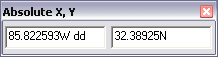
You can include the abbreviation in either the x or y box, but it must be appended after the value. Here is an example of using the dd abbreviation in the Absolute X,Y command on the Sketch tool shortcut menu.
Conversion constants
You can use conversion constants to convert from one measurement system to another. The measurement system to be converted should be multiplied by the associated conversion constant. For example, to convert feet to centimeters, multiply feet by the conversion constant of 30.48 (27 feet x 30.48 = 822.96 centimeters).
View a table of conversion constants
To view this document, you need a copy of Adobe Reader, which you can download free from http://www.adobe.com/products/acrobat/readstep.html.
About the U.S. survey foot
In 1959, the directors of the National Bureau of Standards and the United States Coast and Geodetic Survey agreed on a redefinition of the inch-centimeter relationship. This redefinition defined 1 inch as equal to 2.54 centimeters exactly, or 1 foot as equal to 0.3048 meters exactly. However, their agreement stipulated that the older value for 1 meter equaling 39.37 inches exactly be retained for identifying the U.S. survey foot. One of the reasons for this retention was that the state plane coordinate systems, which are derived from the national geodetic control network, are based on the relationship of 1 meter equaling 39.37 inches exactly.
The difference between these two values for the foot is very small, two parts per million, which is hardly measurable, but not trivial when computational consistency is desired. Fundamental survey units, such as rods, chains, statute miles, acres, sections, and townships, all depend on the relationship of 1 meter equaling 39.37 inches exactly.
The U.S. survey foot table in the PDF represents the corrected values (or U.S. survey values), using the 39.37-inch conversion value.