Extensions > Spatial Analyst > Spatial Analyst functional reference > Math General (Spatial Analyst)
Exp |
|
|
Release 9.3
Last modified September 7, 2011 |


Print all topics in : "Math General (Spatial Analyst)" |
Calculates the base e exponential of cells in a raster.
Illustration
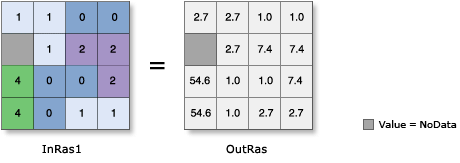
Map Algebra:
OutRas = Exp(InRas1)
Command Line:
Exp_sa InRas1 OutRas
Illustration 2:
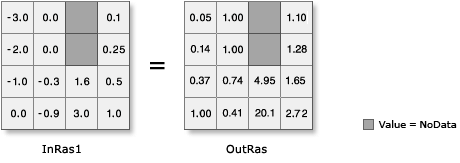
Map Algebra:
OutRas = Exp(InRas1)
Command Line:
outRas = Exp("InRas1")
Usage tips
-
Output values are always floating point, regardless of the input values.
-
The base e exponential is the most commonly used exponential function.
-
Input values less than or equal to -745 will be set to NoData in the output, because these values cannot be accurately represented by 32-bit floating-point numbers.
-
A number can be used as an input; however, the cell size and extent must first be set in the environment.
-
The following environment settings affect this tool:
- General: Current Workspace, Scratch Workspace, Output Coordinate system, Output Extent, Snap Raster.
- Raster Analysis: Cell size, Mask.
- Raster Storage: See the Raster Storage settings for the particular output raster format selected.
-
Output values are always floating point, regardless of the input values.
-
The base e exponential is the most commonly used exponential function.
-
Input values less than or equal to -745 will be set to NoData in the output, because these values cannot be accurately represented by 32-bit floating-point numbers.
-
Learn more about how to specify the input raster dataset in the Map Algebra expression of Raster Calculator.
-
Output values are always floating point, regardless of the input values.
-
The base e exponential is the most commonly used exponential function.
-
Input values less than or equal to -745 will be set to NoData in the output, because these values cannot be accurately represented by 32-bit floating-point numbers.
-
The output from the ArcObjects method is a raster object.
-
A number cannot be used as input to the ArcObjects method. If a constant number must be passed to the method, create a constant raster using IRasterMakerOp::MakeConstant, then pass the results to the method.
Command line and Scripting
Map Algebra
ArcObjects
Command line syntax
An overview of the Command Line window
Exp_sa <in_raster_or_constant> <out_raster>
| Parameter | Explanation | Data Type |
| <in_raster_or_constant> |
Input raster or constant value for which to find the base e exponential. |
Composite Geodataset |
| <out_raster> |
The raster to be created. |
Raster Dataset |
Command line example
Exp_sa C:/data/ras_1 C:/data/final_1
Scripting syntax
About getting started with writing geoprocessing scripts
Exp_sa (in_raster_or_constant, out_raster)
| Parameter | Explanation | Data Type |
| in_raster_or_constant (Required) |
Input raster or constant value for which to find the base e exponential. |
Composite Geodataset |
| out_raster (Required) |
The raster to be created. |
Raster Dataset |
Data types for geoprocessing tool parameters
Script example
# Exp_sample.py
# Description:
#   Calculates the base e exponential of the input on a
#   cell-by-cell basis.
# Requirements: None
# Author: ESRI
# Date: Sept 6, 2005
# Import system modules
import arcgisscripting

# Create the Geoprocessor object
gp = arcgisscripting.create()

try:
    # Set the input raster dataset
    inputRaster = "C:/data/ras_1"

    # Set the output raster name
    outputRaster = "C:/data/final_1"

    # Check out Spatial Analyst extension license
    gp.CheckOutExtension("Spatial")

    # Process: Exp
    gp.Exp_sa(inputRaster, outputRaster)

except:
    # If an error occurred while running a tool, then print the messages.
    print gp.GetMessages()
Map Algebra syntax
Exp(<grid | number>)
| Parameter | Explanation |
| (<grid | number>) | The input to the function.
|
Map Algebra example
exp(ingrid)
exp(ingrid1 + ingrid2)
exp(ingrid1 div pi)
ArcObjects syntax
IMathOp::Exp (geoDataset As IGeoDataset) As IGeoDataset
| Parameter | Explanation |
| geoDataset | An input Raster, RasterDataset, RasterBand, or RasterDescriptor for which to find the base e exponential. |
ArcObjects example
' Create the RasterMathOps object
Dim pMathOp As IMathOp
Set pMathOp = New RasterMathOps

' Declare the input raster object
Dim pInputDataset As IGeoDataset

' Calls function to open a raster dataset from disk
Set pInputDataset = OpenRasterDataset ("D:\SpatialData", "inputraster")

' Declare the output raster object
Dim pOutputRaster As IGeoDataset

' Calls the method
Set pOutputRaster = pMathOp.Exp (pInputDataset)