GIS Servers and services > Creating and publishing web maps for ArcGIS Server
A framework for deploying Web GIS |
|
|
Release 9.3
Last modified March 23, 2011 |


Print all topics in : "Creating and publishing web maps for ArcGIS Server" |
As a GIS practitioner, your goal is to provide your users with a GIS map application that enables them to get their work done without having to learn a lot about GIS. Instead, your users can focus on using the web map application (which provides their view of the GIS) and the tasks that help them perform their daily work.
By necessity, your concept of each GIS web map application that you build is more complex than your end user's view. This section describes all of the elements that you must assemble as part of each GIS application. These elements provide a framework for how to build and deliver Web map applications to your end users.
Elements of a GIS web map application
The are five essential ingredients in every GIS map.
1. A GIS software application
2. A digital base map
3. Operational layers
4. Tasks and tools for working with the layers
5. A geodatabase and other information sets
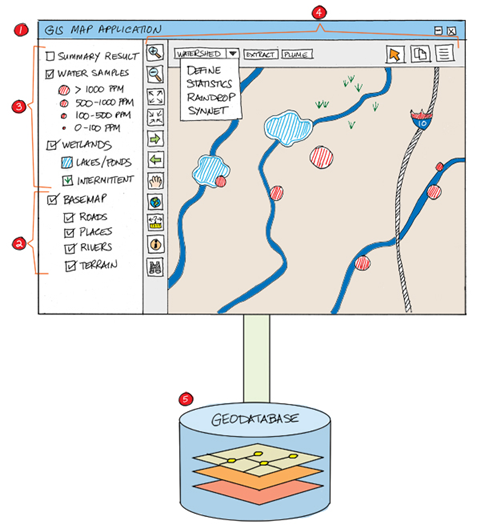
There five key elements in a GIS web map application, all of which can be accessed through the web or a local area network.
Any or all of these can be deployed as a set of ArcGIS (and other) web services. Often web map applications can be assembled from existing web services.
Here is a brief description of each of these elements.
1. A GIS application
The application is the software interface and its corresponding tools that are used to visualize, interact, and work with geographic information. The application can be one such as ArcMap, Google Earth™, or ArcGIS Explorer. It might also be a Web application that runs in a Web browser. Or, it could be a mobile application that works on a GPS-enabled field device or a smart phone such as ArcGIS Mobile.
A number of application choices are available to build GIS map applications for your end users. Often, the right choice depends on the set of functions, tools, and map displays required by the user's workflows. Just as often, the choice of application will depend on the end user and his or her experience at using computers and the setting in which the work is done (e.g., in the field, in a remote office with slow Internet speeds, etc.).
See Common types of GIS map applications for more information.
2. A digital base map
Each map application includes a 2D or a 3D base map onto which operational information, observations, and derived information results are displayed and used. For example, orthoimagery is often used as a general base map onto which operational information is overlaid.
A base map is used for locational reference and provides a context on which users overlay (mashup) their operational layers, perform tasks, and visualize geographic information. Many web GIS applications allow you to toggle between two or three base maps (e.g., between a street map and an image map).
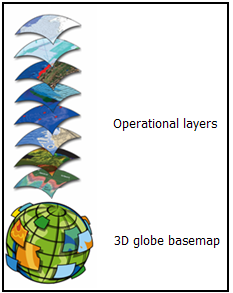
In GIS applications, users combine their operational information onto a 2D or 3D base map.
A base map is a map having essential outlines (and more often than not, imagery) onto which additional geographical, topographical, and operational data may be placed. The base map serves as a foundation for all subsequent operations and mapping and a framework for working with information geographically.
In GIS map applications, the base map provides the setting (i.e., the context) for each application. The type of application (e.g., hydrology, parcels, electrical utilities, conservation) often defines the types of base maps that you'll need to use.
How base maps differ from traditional GIS maps
In traditional GIS, most map applications (e.g., ArcMap) include a series of independent map layers. The GIS map's table of contents lists all layers and their drawing order. In many cases, map scale has not explicitly been considered in the design for each map layer. In these GIS maps, the map scale for each individual map layer is not necessarily identified. For example, users must know when to run on or off each layer at various map scales.
By contrast, GIS Web maps are designed for use at a range of map scales. Also, the map layers are designed to represent base map layers or as operational map layers.
This will affect how you compile and assemble your map documents for publishing on the web. The help topic named ArcMap application patterns provides more information on how to think about the patterns of map layers that apply in various ArcMap application scenarios (e.g., map design for publishing an ArcGIS base map service).
Types of base maps
A number of types of base maps can be published, each serving a particular range of applications. Some examples of common base maps can include:
- Street base maps containing roads, street names, points of interest, generalized land use, water bodies, and place names. Commonly used examples of these are provided by ArcGIS Online, Microsoft Bing Maps™, and Google Maps™ / Google Earth™.
- Topographic maps that are produced by many national mapping agencies.
- Hydrological base maps showing water bodies, terrain, watersheds, and stream gauges.
- Image maps with terrain
- General use city maps to support various operations and missions
- Cadastral base maps for parcel information management and use
- Administrative boundary maps (e.g., census boundaries, political districts, zip codes or postal codes, school districts, etc.)
- Engineering base maps
Some base maps include optional layers that you can toggle on and off as map overlays -- for example, map layers such as water utilities or electrical utilities are often included as base map overlays displayed on top of a land base for facilities management work.
Frequently, base map layers are designed for display on top of an image base. For example, feature boundaries, symbols, and text labels are used as imagery overlays.
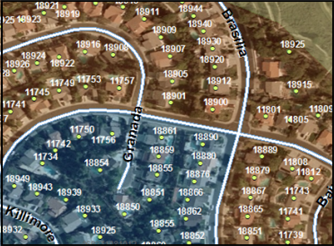
Base maps tend to be relatively static, and in a typical setting are updated on an infrequent basis. To increase efficiency, users build cached map services for their base maps (i.e., they pre-compute the base map and serve the base map as a series of high performance, scalable Web services).
GIS users can follow a number of strategies for building and deploying base maps for their GIS applications. For example, you can:
- Use an existing Web map such as a base map from ArcGIS Online or Microsoft Bing Maps™.
- Extend ArcGIS Online Web maps by adding your GIS content to extend an existing base map. For example, you can add larger scale content for your area of interest using your own GIS data.
- Use another GIS organization's base map service.
- Build, maintain, and serve your own GIS base maps.
For more information, see How to build online base maps.
Tools for working with GIS base maps
There are a common set of operations that are included for working with GIS base map services -- for navigating around the base map (pan, zoom, etc.), for feature identification (i.e., useful informative information popups), and for finding locations (e.g., to find the location of an address or place name and zoom to that location). Often, specific locator tools will be needed -- for example, in a hydrological base map, you may want to search on watersheds or on the names of river systems.
You may discover that your users will require a mechanism to easily find specific locations in their map using names that are relevant for their application -- for example, tools to locate forest stands, river systems, watersheds, catchment areas, council districts, police beats, etc.
You will need to think about how you include these tools and capabilities in your base maps. See Tasks and tools in the GIS application below for more information.
3. Operational layers

These are a focused set of map layers that your users will work with directly or derive as the result of an operation (say an analytical model or a query).
Each map application is targeted for use by a particular group of users. The work and mission of each user requires working with a set of operational layers in their GIS map application. For example, an editor in an electrical utility uses ArcMap as his or her application, a land base as the base map, and edits the electrical facilities network as an "operational layer" as part of their daily work.
There are at least four types of operational map layers:
-
Editing and data access layers. These are the map layers that your users work with, for example, to edit features, to perform queries, and to select features for input to analysis. Common examples are the facilities layers edited in a utility or other map layers that can be queried and used by end users.
-
Observations or sensor feeds. This can be any information that reflects status or situational awareness -- for example, crime locations, traffic sensor feeds, real-time weather, readings off of meters (such as stream gauges), observations off of equipment or made by workers in the field, inspection results, addresses of customers, disease locations, air quality and pollution monitors, etc. These information sources are often displayed as status information in GIS Web maps. Also, they are frequently used as inputs into analytical operations that are computed on the ArcGIS Server.
-
Query results. In many cases, applications will make a query request to the server and return a set of records as results. These can include a set of individual features or attribute records. Users often display and work with these results as map graphics in their Web GIS map applications. This approach typically requires application programming to create a map layer of results.
-
Result layers that are derived from analytical models. GIS analysis can be performed to derive new information that can be added as new map layers and then explored, visualized, interpreted, and compared.
In most GIS applications, users work with operational layers on top of their base map, which provides the geographic context. At other times, the operational layer is displayed underneath other layers that help to provide locational context -- For example, when you classify and display zip or postal code areas by demographic information, you often overlay the demographic results with transportation lines and place names to provide locational context.
Operational layers as interactive reports. In many situations, each operational layer can be used to generate information popups by clicking on its features. For example, you can pop up information by clicking on earthquake events as shown here.
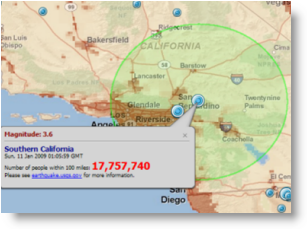
Popup information that summarizes population within 100 miles of each earthquake location.
In other situations, users include tools for working with selected features and using the results to generate graphs or reports such as the example shown here.
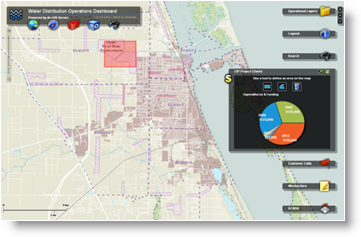
Information about incidents, work orders, and other feature reports for operational layers within a water utility. This report summarizes captial improvement expenditures for selected plan areas. Plan areas are selected that touch the red boxas shown in the map.
It is also worth noting that some of the same datasets that are used in your GIS base map will also frequently be used as data sources for operational layers in your web map applications.
For more information about building and serving operational layers, see Building operational map layers.
4. Tasks and tools in the GIS application
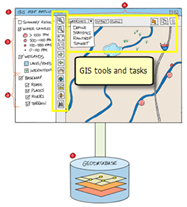
The GIS application that you create will include various tools for interacting and working with geographic information. One perspective to take on the tools in your web GIS application is that the set of tools go with each map layer -- not with the application itself.
The tools you include in your GIS map application are tied either to the base map or to the set of operational layers contained in your application. For example:
- Pan/zoom/navigation tools for use with your base map
- Locate and Find tools for use with the base map
- Identify on operational layers to generate information popups
- Use a geoprocessing tool to generate a result layer to be used in interactive web reporting
- And so on
Tools for working with base maps
Most GIS applications include a set of map navigation tools -- to pan and zoom the base map, identify and query features, and to find locations such as an address or place name.
Many GIS applications and base maps also include tools for address geocoding and finding place names. Common "Locator" tools are useful for zooming to map locations based on address, place name, XY coordinate, latitude-longitude measurement, or application-specific locations.
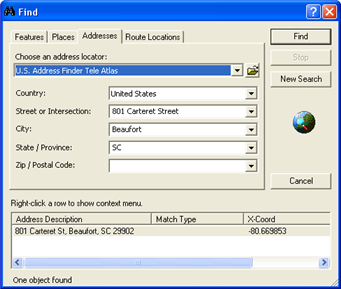
Locator tools may need to be built to work within the context of the specific base map you deploy. For example, if you are a local government GIS user, you will likely want to use an address locator that is focused on finding addresses in your local area based on your own up-to-date, more authoritative address and street information. See Geocoding for more information on creating, publishing, and using your own address locators in ArcGIS.
Tools for working with operational layers
The primary tools you will want to include in your GIS map application are the ones that your users will employ to work with the operational layers in the application. Your end users will utilize these to perform critical tasks and to analyze and summarize their operational information, observations, and results. These tasks are very often part of a set of workflows.
In many GIS map applications, the set of tools for working with operational information can be quite focused and specific to each particular type of end user. The required set of tools often dictates the type of GIS application to be used.
Here are some examples for how users work with their operational information.
- Users who are editors require a series of focused editing tools that help them accomplish their specific editing workflows and editing assignments. For example, tools to edit a cadastral or parcel framework will differ from the tools used to compile electrical facilities or hydrological information.
- Many end users have a set of target layers and an associated set of tools to work with those layers. For example, tools to find and route to the closest facility, to calculate stream flows based on current conditions, or to perform point pattern analysis on a set of accident locations.
- For sensor feeds, there are often sets of tools for displaying, summarizing, graphing, and analyzing sensor feeds from the field.
- Many GIS map applications include software functions to perform GIS modeling and analysis along with tools to work with, visualize, and analyze the results. Geoprocessing tasks are used to generate analysis results, and interactive map tools are used to work with the results. For example, there can be a series of tools to chart, analyze, and visualize the results of a model (such as to classify and map the results, perform statistical summaries, generate tabular reports, generate graphs, and so on).
- In some GIS map applications, users submit queries to the server which returns a set of features and their attributes. These results are displayed on the map as client-side graphics, which can be clicked on to access more detailed tabular information.
Using geoprocessing tasks to perform GIS analysis
A common use of GIS servers is to perform GIS modeling and analysis. These GIS services are used to generate a set of results that can be viewed, analyzed, and used in your GIS application. Most results are created using geoprocessing models.
Geoprocessing is the methodical execution of a sequence of operations on geographic data to create new information (i.e., "results"). The process you perform may be routine—for example, to help you convert a number of files from one format to another. Or, the operations can be quite sophisticated—for example, to create a sophisticated analytical model and to publish that model as a task using ArcGIS Server. Geoprocessing models are used to generate a series of results, which your end users can display, analyze, and evaluate in their GIS applications.
Once the results are generated and served, GIS application users will require various tools in their Web map application to visualize, analyze, summarize, compare, and report the results.
Determining what tools that each user needs is key to building successful GIS map applications.
When geoprocessing models are published using ArcGIS Server, they are referred to as "tasks."
See An overview of geoprocessing with ArcGIS Server for more information.
5. A fully operational geodatabase
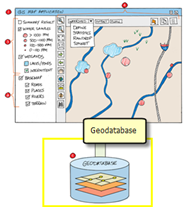
You can think of each GIS map application as providing more than a map view. They also provide a window into one or more geodatabases.
Each GIS application depends on a strong geospatial data management framework that can hold the information used to create and support all of your GIS applications. This can be one or more geodatabases, a collection of shapefiles, various tabular databases and spreadsheets, CAD files, design files, imagery, HTML Web pages, and so forth.
You'll need one or more repositories of geographic information used across your GIS organization to support this work. Your base maps must be created and maintained using a strong, up-to-date, and integrated GIS information model. Datasets must be edited and maintained. Observations must be captured. Analytical results must be logged and stored. And so on.
Geodatabases are particularly critical for managing not just collections of individual features, but also to store and model the spatial relationships and behaviors that are critical for many GIS tasks and analytical operations.
There is a strong focus in the GIS professional community on investing in and building high-quality geographic information. The answers you derive from your GIS can be no better than the quality of the information contained in your GIS database. GIS datasets must be compiled in unison, harmonized, and integrated to fit together in a geographic framework. Many GIS users invest heavily in the creation and maintenance of their geospatial databases. These information stores are of immense value in addressing a broad range of questions. Strong geographic data becomes more critical when you want to do more than simply display observations on a base map.
The ArcGIS geodatabase is a very strong and critically important data management technology for modeling, organizing, and maintaining rich GIS information to support your GIS work. Geodatabases are designed to support all levels of GIS implementation from those that support the simplest geodata models to those that are quite sophisticated. Refer to Geodatabase essentials for more information.
Web services help you to deploy this framework
It is worth noting that any of these elements in a web GIS map application can be hosted and served using ArcGIS Server. For example, various web services can be accessed and assembled as part of your GIS map application -- a base map service, operational map services, geoprocessing services, geodata services, image services, and so forth.
One of the great strengths of web GIS map applications is that you can mash up remote web services with your own local content to assemble your GIS applications. It is worth the effort to take time to think about deploying your information resources using ArcGIS Server and to leverage your GIS services (as well as services from other organizations) in your GIS map applications.
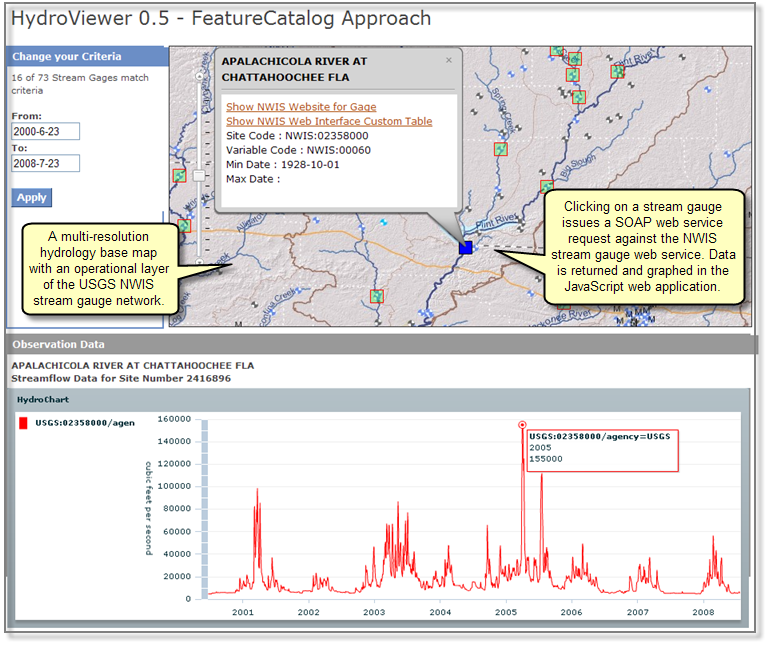
Here is an example implementation of a GIS web map application using the JavaScript interface to ArcGIS Server, which also queries the NWIS stream gauge network from USGS and returns time series observations for stream flow (http://waterdata.usgs.gov/nwis). These observations are accessible via a web services protocol called WaterOneFlow, published by the Hydrological community. For example, see http://water.sdsc.edu/wateroneflow/.