Hotine Oblique Mercator |
|
|
Release 9.3
Last modified October 21, 2008 |


|
Description
Also known as Oblique Cylindrical Orthomorphic, this is an oblique rotation of the Mercator projection. Developed for conformal mapping of areas that are obliquely oriented and do not follow a north–south or east–west trend.
Learn more about the Mercator projection
Projection method
Cylindrical. Oblique aspect of the Mercator projection. Oblique Mercator has several different types. You can define the tilt of the projection by either specifying two points or a point and an angle measuring east of north (the azimuth).
By default, the coordinate origin of the projected coordinates is located where the central line of the projection crosses the equator. As an example, if you use an Oblique Mercator (natural origin) for West Virginia, while the center of the projection is -80.75, 38.5, the natural origin is approximately -112.8253, 0.0. You can move the projection origin to the center of your data by using the Two-Point Center or Azimuth Center cases.
Line of tangency
A single oblique great-circle line or secant along two oblique small circles parallel to and equidistant from the central great circle.
Linear graticules
Two meridians 180° apart.
Properties
Shape
Conformal. Local shapes are true.
Area
Distortion increases with distance from the central line.
Direction
Local angles are correct.
Distance
True along the chosen central line.
Limitations
Use should be limited to regions near the central line. When using a spheroid, constant scale along the central line and perfect conformality cannot be maintained simultaneously.
Uses and applications
Ideal for conformal mapping of regions that have an oblique orientation.
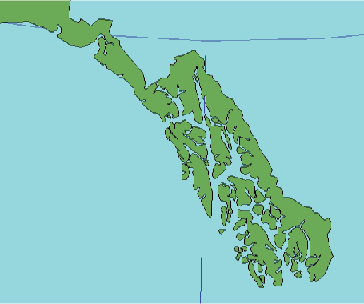
Used for large-scale mapping in the Alaskan panhandle. Switzerland uses a different implementation of Oblique Mercator by Rosenmund, while Madagascar uses the Laborde version. These implementations are not compatible with the Oblique Mercator projection that is available in ArcInfo workstation.
Parameters
Desktop
Azimuth case
- False Easting
- False Northing
- Scale factor
- Azimuth
- Longitude of center
- Latitude of center
Two Point case
- False Easting
- False Northing
- Latitude of 1st point
- Latitude of 2nd point
- Scale factor
- Longitude of 1st point
- Longitude of 2nd point
- Latitude of center
Workstation
- Enter projection type <1 | 2>
Type 1 uses a central line defined by two points.
- Scale factor at the projection's center
- Latitude of the projection's center
- Longitude of 1st point on the central line
- Longitude of 2nd point on the central line
- Latitude of 2nd point on the central line
- False Easting (meters)
- False Northing (meters)
Type 2 uses a central line defined by one point and its angle of azimuth.
- Scale factor at the projection's center
- Longitude of the projection's center
- Latitude of the projection's center
- Azimuth at the projection's center
- False Easting (meters)
- False Northing (meters)