Show Navigation
|
Hide Navigation
How Buffer (Analysis) works |
|
|
Release 9.3
Last modified January 11, 2011 |


|
NOTE: This topic was updated for 9.3.1.
Basic of how buffers are created
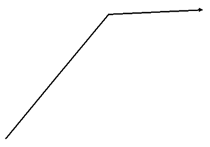
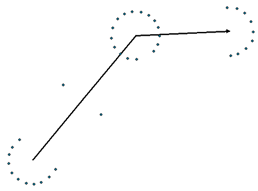
The buffer routine traverses each of the input feature's vertices, and creates buffer "offsets", then from those offsets output buffer features are created.Input line feature
Offsets created around the input line feature
Buffer derived from the offsets

The parameters on the buffer tool control many aspects of the offsetting process, as well as how the resulting buffer features are assembled.
Buffer distance
The buffer distance can be specified as a numeric value and unit of distance, for example "100 Meters".The buffer distance can also be specified as the name of one of the input feature class' field. When selecting a field as the buffer distance, the field must contain numerica values, then as the buffer operation is performed on each input feature, that feature's buffer field value will be used as the buffer distance.
Offset side and line ends
When buffering lines, the "End type" parameter controls if the ends will be ROUND or FLAT. The "Side type" controls which side of the line the offsets will be created. With a polygon input feature class, the "OUTSIDE_ONLY" option becomes enabled.Dissolve
The dissolve parameter controls how the resulting buffers will be assembled before writing them to the output feature class.The NONE option causes each input feature to be buffered independently. For each input feature, one feature is written to the output feature class. The output feature has all the input feature's attributes with the addition of a field named BUFF_DIST containing the buffer distance used on that particular feature.
The ALL option causes ALL features to be dissolved into a single feature. In the past this generated extremely large features which caused a variety of problems. At 9.3 an upper limit has been set for the size of features that can be dissolved. For details see documentation for the Dissolve tool.
The LIST option groups the input features based on unique values in the "Dissolve Field" specified. The groups are buffered and then dissolved into a single output feature.
Example 1: Fixed distance
Buffer of a line feature class using a Distance of 20, an End Type of FLAT, a Side Type of FULL, and a Dissolve Type of ALL.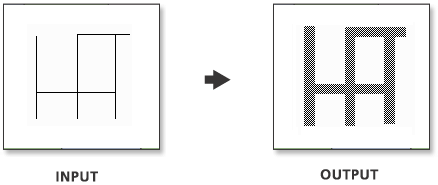
Because the buffer distance is a constant, all features are buffered to the same width.
Example 2: From field
Buffer of a line feature class using a numeric field with values of 10, 20, and 30 for Distance, an End Type of FLAT, a Side Type of FULL, and a Dissolve Type of ALL.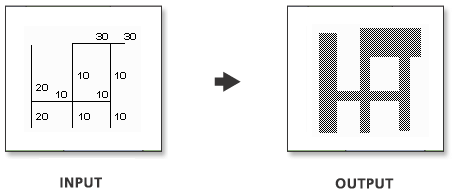
Because the buffer distances are dependent on the field values, various buffer widths can be applied in the same operation.
Geodesic buffer
There are two methods for generating buffer offsets: Euclidean (or 2D Cartesian) and Geodesic.Euclidean buffer
The input geometry is buffered by calculating offsets using a two-dimensional distance formula.For best results the buffer operation should be performed in a projected coordinate system that minimizes distortion for that particularinput dataset.Geodesic buffer (point and multipoint only)
The input geometry is buffered by calculating each offset by projecting it on the surface of the earth (ellipsoid).The geodesic buffer approach yields buffers which are not affected by the distortions that are inherent in a projected coordinate system.
This approach is an especially critical when generating buffers for features stored in a geographic coordinate system. This is due to the fact that although the conversion from degrees of latitude is fairly constant throughout the coordinate system, the conversion from degrees of longitude to linear distances varies greatly as you move away from the equator.
For example, at the equator 1 decimal degree is equivalent to 111.325 kilometers, but as you move north or south from the equator, the lines of longitude come closer and closer together, at 30 degrees of latitude a degree of longitude measures 96.49 kilometers, at 60 degrees of latitude a degree of longitude is only 55.80 kilometers, eventually all longitudes converge to a point at the poles.
The graphic below shows how the squares described by one degree of longitude and one degree of latitude vary in shape and size as you move further and further from the equator.
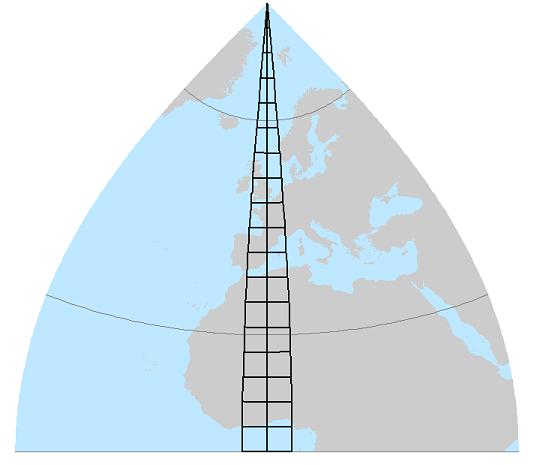
The geodesic buffer algorithm is used when these 3 criteria are met:- the input feature class contains point or multipoint- the input feature class has a geographic coordinate system (Unprojected)- the buffer distance is specified with a linear unit (e.g., Millimeters, Centimeters, Decimeters, Meters, Kilometers, Inches, Miles, Nautical Miles, Yards)
Example of an analysis which is made possible with geodesic buffers
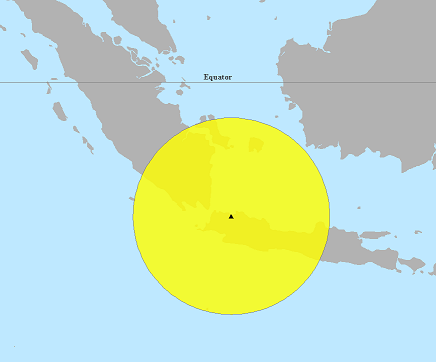
The goal is to generate 500 kilometer buffers around a selected set of world cities. In the past, this was quite difficult to accomplish, now simply pick your input point layer (symbolized with black triangles below) and specify the buffer distance to be "500 kilometers".
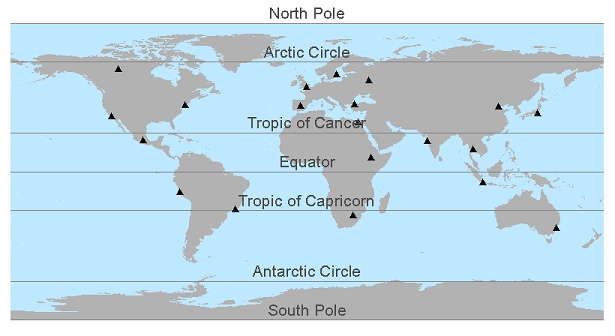
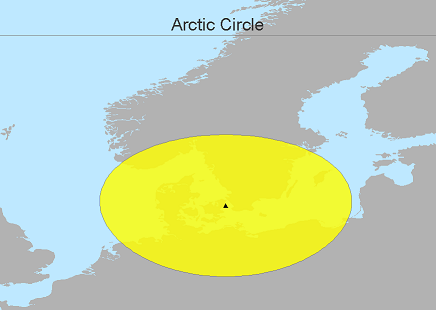
The resulting buffers appear more and more distorted as you move further and further away from the equator.
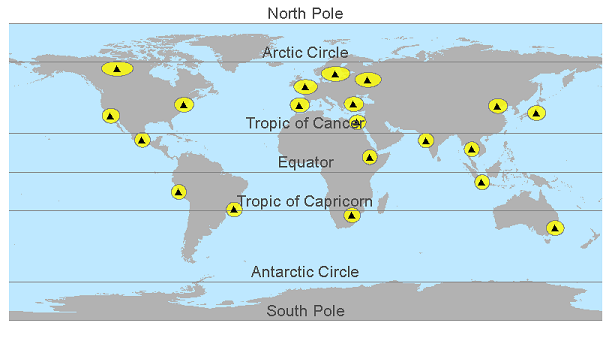
Jakarta is only 6 degrees from the equator so the buffer generated for it is quite circular.
Stockholm on the other hand is 59 degrees north of the equator. When rendered in a geographic coordinate system, the buffer looks quite distorted, especially in the east and west direction. Using the Measure tool in ArcMap will return a distance of 500 kilometers from the point to the resulting buffer's edge in all directions. This is because the Measure tool also calculates geodesic distances. See Measuring distances and areas .
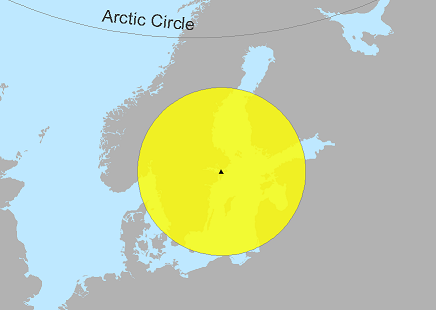
Switching ArcMap's data frame coordinate system to UTM zone 33 (appropriate for Stockholm) shows that in a appropriate projected coordinate system the buffer is very much circular in shape.
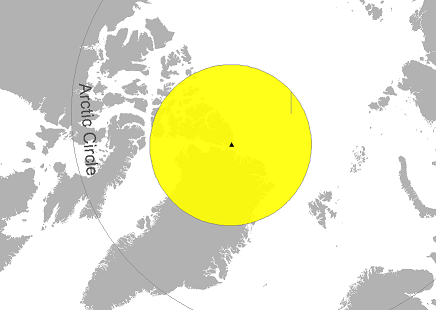
Alert, in Canada's territory of Nunavut, is the northernmost permanently inhabited place in the world. It's location is represented by a black triangle below. The result of generating a "1000 kilometer" geodesic buffer around that point is represented by the yellow area.
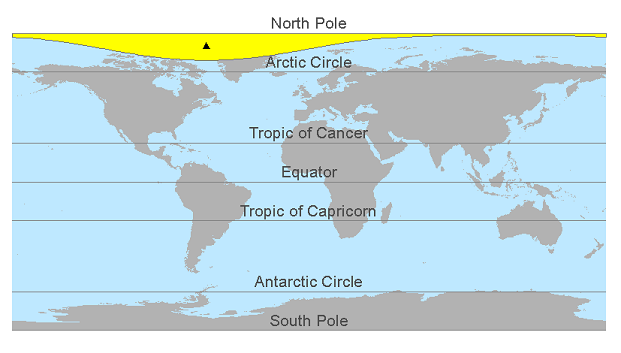
When ArcMap's data frame coordinate system is set to "North Pole Gnomonic" the buffer around Alert is also circular.
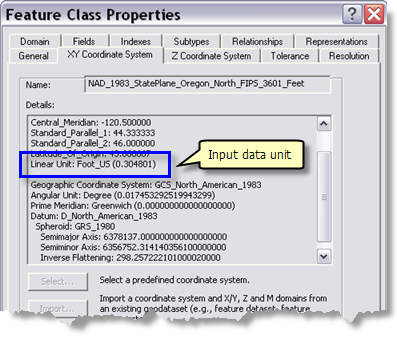
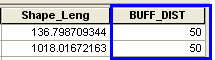
Before 9.3, the BUFF_DIST field reflected exactly the value you entered. For example, if your data's spatial reference [SR] was State Plane feet and you used a 50 meter buffer distance, you saw this in the output data's attribute table:
Beginning in 9.3, the value shown in the BUFF_DIST field is in the units of your input data. Given the same scenario as above, now the 50 meter buffer distance you entered will be converted to your input data's units of measure, in this case feet. You will see this value [with some exceptions, see below]:
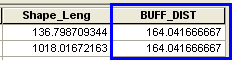
There are two exceptions to this:
- If your data is in Geographic Coordinate System [GCS] with angular units [DD] and you use a linear unit such as kilometers or miles as buffer distance unit, no conversion is applied. The value you see in the BUFF_DIST field is exactly the value you entered in the units you entered them.
- If your data's spatial reference is Unknown no conversion is done; so you see either the angular or linear unit value you entered in the BUFF_DIST field.
It is important for you to remember that the BUFF_DIST value units are always that of the Output coordinate system environment when it is set.
The following table summarizes the possible scenarios when the Output coordinate system environment is not set. Note that "Linear" includes both metric and non-metric units of measure.
| data coordinate system units | Buffer distance units | Units for distance in BUFF_DIST field
|
| Angular | Angular or linear | No conversion |
| Linear | Angular | Converted to coordinate system units |
| Linear | Linear | Converted to coordinate system units |
| Angular or Linear | Unknown | Assumed to be input coordiate system units |
| Unknown | Angular or Linear | No conversion |