Radial Line of Sight parameters |
|
|
Release 9.3
Last modified December 4, 2009 |


|
Center offset—The center offset refers to the observer’s height above the ground surface in meters and corresponds to the OFFSETA attribute in the observer point shapefile attribute table. It can be used to simulate the view from a tower, building, or aerial observation. The default value is two meters, representing the height of a standing person. The center offset must be a positive value.
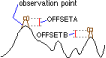
Terrain offset—The terrain offset indicates a vertical distance in surface units to be added to the z-value of each cell as it is analyzed for visibility, and it corresponds to the OFFSETB attribute in the observer point shapefile attribute table. It can be used to simulate tree heights. The terrain offset must be a positive value.
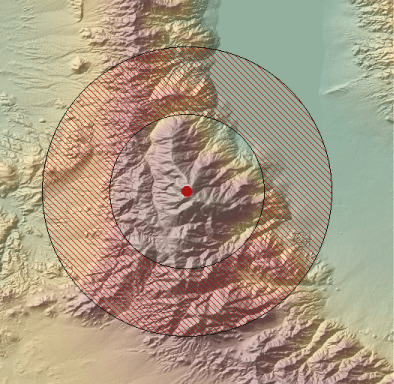
Distance range—The distance range parameter is the distance from the center, or observer point, for which the radial visibility will be calculated. The range can begin at the observation point (start distance equal to 0) or at a specified distance from it. Typing a value greater than 0 as the starting distance will create a doughnut-shaped viewshed. Pixels beyond the end distance are excluded from the analysis. Pixels closer than the start distance can still affect the visibility. The default value for the distance range is 0–10 kilometers.
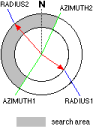
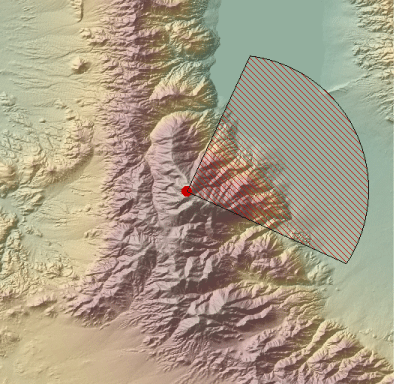
Azimuth range—The azimuth range refers to the horizontal angle limits of the field of view of the observer and is measured in degrees from 0–360. Typing "0" as the start azimuth and "360" as the end azimuth will cause the tool to generate a circular viewshed, while typing any other range will display the viewshed of a partial circle. The default range is 0–360 degrees. The first value in the azimuth range corresponds to the AZIMUTH1 attribute in the observer point shapefile attribute table, and the second value corresponds to the AZIMUTH2 attribute.
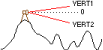
Elevation range—The elevation range refers to the vertical angle limits of the observer above and below the horizon. The default values are -90 to 90 degrees (or straight up and down). The first value in the elevation range corresponds to the VERT1 attribute in the observer point shapefile attribute table, and the second value corresponds to the VERT2 attribute.
Observer elevation—The observer elevation defines an absolute elevation value above mean sea level for the observer. If this option is selected, the observer’s elevation will not be interpolated from the surface. The observer elevation corresponds to the SPOT attribute in the observer point shapefile attribute table.
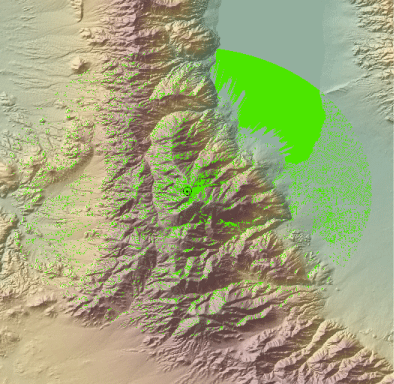
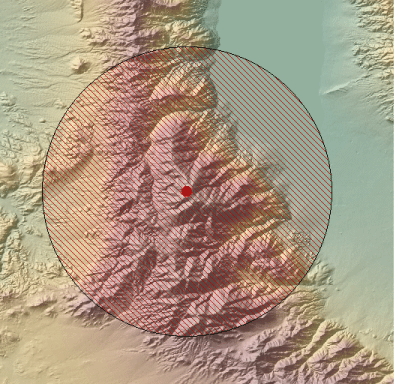
The image below shows that when you place an observer point in the data frame, the field of view will display around the point with its geometry based on the parameters set in the Radial Line of Sight dialog box.
As the following illustration demonstrates, when you type a value greater than 0 as the starting distance in the Distance Range field, a doughnut-shaped field of view will result. The visibility of cells in the area between the observer and start distance will not be displayed in the output, but they are still used in the calculation.
As the illustration below shows, when you type a starting value of 0 and an ending value of 360 in the Azimuth Range field, a circular field of view is generated. Any other value range will generate a partial circle. Only values from 0–360 are valid.
In the illustration below, a polygon shapefile was generated because the radial visibility was computed. The visible areas within the field of view are displayed as slightly transparent green polygons.