The ArcGIS family of products—ArcGIS Desktop, ArcGIS Engine, and ArcGIS Server—are all built from ArcObjects. A casual user of ArcGIS Desktop is probably not aware of, nor cares about, ArcObjects. They simply run, for example, ArcMap and edit their map. It's not until they want to start customizing ArcGIS Desktop or building their own applications that they become more familiar with ArcObjects.
The main difference between running a desktop application and a GIS server based application is where the ArcObjects reside. For desktop applications, the objects needed for the application are instantiated and run in the application itself on the local machine. For instance, when you start ArcMap and open a map document, the ArcMap application instantiates the objects that allow you to draw the map, add layers, edit the layout, and so on. Essentially, all the objects stored in the map document are rehydrated for use during that ArcMap session. When you save the map, the current state of the objects used during the session is written to the map document for later use.
Unlike desktop applications, clients of a GIS server based application access the ArcObjects remotely. You can think of your GIS server as the container that hosts the objects for all client applications that need to use them in much the same way an ArcMap session hosts the objects for an individual user. However, with the GIS server, objects are shared between clients. Because of this, the way clients use the GIS resources running on the server is a little different. When you create an application that accesses a GIS server, you need to follow the prescribed coding guidelines for accessing the objects running on the server. These guidelines are presented and described in the Developer Help system.
If you're familiar with ArcGIS Desktop, then you're also familiar with the GIS resources you work with in the desktop environment. For example, if you want to display your GIS data, you do so through maps and globes. If you want to find locations by their address, you use an address locator. If you want to do some analysis, you use the geoprocessing tools in the toolbox. Each of these items encapsulates some level of GIS functionality. Fundamentally, the GIS functionality is exposed through a specific set of ArcObjects that implement the functionality.
On the GIS server, instead of working with, for instance, map documents, globe documents, and address locators, you work with map services, globe services, and geocode services. GIS resources which have been made available on the server are collectively referred to as services. Actually, you'll still use map documents, globe documents, and address locators as these are the source for the services you host on the GIS server. Thus, if you want to share a map you've made on the GIS server, you use the map document to define the map service that runs on the server.
The main purpose of a GIS server is to host services and give them out to client applications that need to use them. Additionally, the GIS server provides a set of tools that allow you to manage the services; for example, you can use the ArcGIS Server Manager application to add and remove services.
It's useful to understand how a GIS server system is put together so that you can build applications that effectively utilize ArcObjects running in a server environment. This section serves as an introduction to the components that comprise a GIS server.
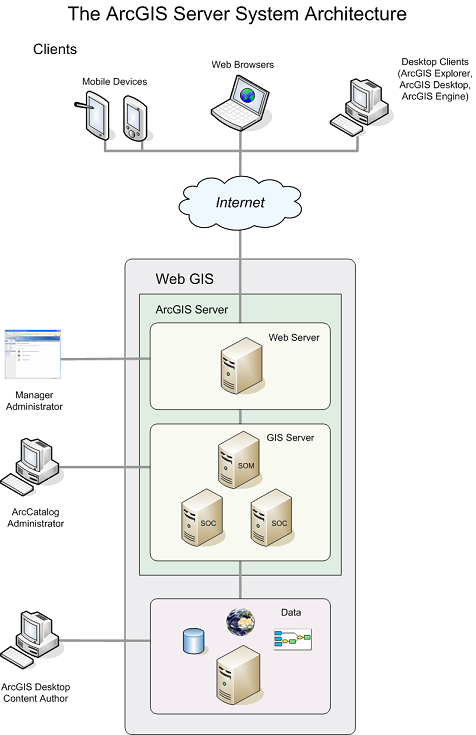
The ArcGIS Server system architecture
An ArcGIS Server system is made up of some of the following components:
-
GIS server— The GIS server hosts your GIS resources, such as maps,
globes and address locators and exposes them as services to client
applications.
The GIS server itself is composed of two distinct parts: the server object manager (SOM) and server object containers (SOCs). As the name implies, the SOM manages the services running on the server. When a client application requests the use of a particular service, it's the SOM that actually gives one out for the client to use.
The SOM connects to one or more SOCs. The SOC machines—also referred to as container machines—contain, or host, the services that the SOM manages. Depending upon your configuration, you may run the SOM and SOC on different machines and also have multiple SOC machines. The figure above shows a SOM machine connected to two SOC machines.
- Web server— The Web server hosts Web applications and Web services that use the resources running on the GIS server.
- Clients— Client applications are Web, mobile, and desktop applications that connect over HyperText Transfer Protocol (HTTP) to ArcGIS Server Internet services, or ArcGIS Server Local services over a LAN or WAN.
- Data server— The data server contains the GIS resources that have been published as services on the GIS server. These resources can be map documents, address locators, globe documents, geodatabases, and toolboxes.
-
Manager and ArcCatalog administrators– ArcGIS Server administrators can
use either Manager or ArcCatalog to publish their GIS resources as services.
Manager is a Web application that supports publishing services, administering the GIS server, creating Web applications, and publishing ArcGIS Explorer maps on the server.
ArcCatalog includes a GIS Servers node which can be used to add connections to GIS servers for either general server usage or administration of a server's properties and services.
- ArcGIS Desktop content authors– To author the GIS resources such as maps, geoprocessing tools, and globes that will be published to your server, you will need to use ArcGIS Desktop applications such as ArcMap, ArcCatalog, and ArcGlobe. Additionally, if you're creating a cached map service, you'll need to use ArcCatalog to create the cache.