|
Synchronizing with filters and related data (ArcInfo and ArcEditor only) |
|
| Release 9.3 |    |
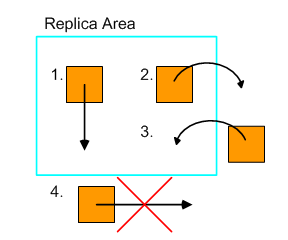
NOTE: In order for the edit to be sent, the feature must have existed inside the replica filter at the time of the previous synchronization. For example, if you insert a feature, move it out, and then synchronize with the relative replica, these changes will not be sent.
 Filters based on selection sets are applied during replica creation but are ignored during synchronization. The synchronization process treats a selection set filter as if it is all rows. For example, if only a selection set is used to define the rows to replicate from a table during replica creation, all changes made to that table are applied during synchronization. If a selection set and other filters were used to define the rows to replicate from a table during replica creation, only the other filters are applied during synchronization. For example, if a selection set and a definition query are applied during replica creation, only the definition query is applied during synchronization.
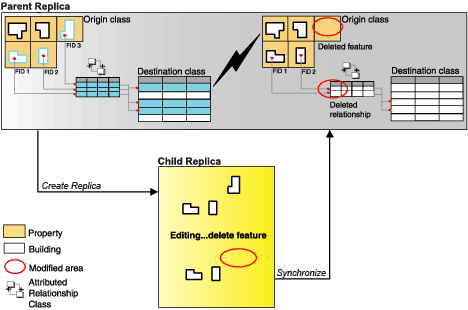
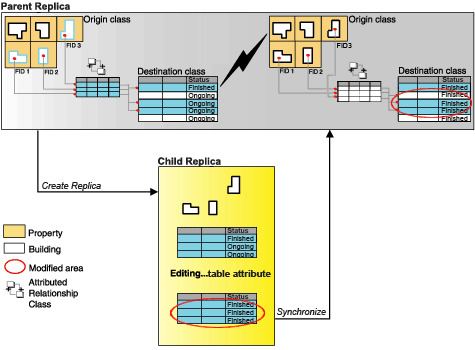
If the data that you are replicating includes relationship classes, it will have an effect on the synchronization process. The following describes how relationship classes are applied during synchronization.
If an edit does not satisfy the filters, it may still be synchronized if it meets the following criteria:
Filters based on selection sets are applied during replica creation but are ignored during synchronization. The synchronization process treats a selection set filter as if it is all rows. For example, if only a selection set is used to define the rows to replicate from a table during replica creation, all changes made to that table are applied during synchronization. If a selection set and other filters were used to define the rows to replicate from a table during replica creation, only the other filters are applied during synchronization. For example, if a selection set and a definition query are applied during replica creation, only the definition query is applied during synchronization.
If the data that you are replicating includes relationship classes, it will have an effect on the synchronization process. The following describes how relationship classes are applied during synchronization.
If an edit does not satisfy the filters, it may still be synchronized if it meets the following criteria:
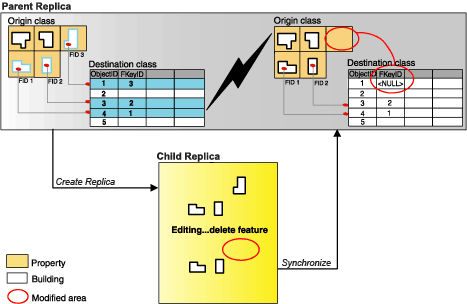 This synchronization behavior may also result in the deletion of rows representing relationships in an attributed relationship class table (as seen in the next example).