How to Use the Harvesting Service
The Harvesting Service is a Windows service that works as a scheduled process to harvest from registered repositories at specified time intervals. The Harvesting Service pings the Geoportal and finds out what repositories are queued to be harvested at that time. Then the Harvesting Service runs the Harvesting Tool on the repositories that are queued for harvest. The Harvesting Service is useful for harvesting automatically from sites at pre-defined time intervals.
For information on how to install and configure the Harvesting Service, please see the Harvesting Service section of the Geoportal Extension 9.3.1 Installation Guide.
The following is a basic workflow for the Harvesting Service:
- The Portal Administrator installs the Harvesting Service, and configures it to run at a specified time interval. The Harvesting Service is started.
- A Publisher user logs in to the Geoportal and registers a repository for harvesting. He/she specifies how often the repository should be harvested (Once every month, Twice every month, Once every week, Once a day, Once a hour, Only once).
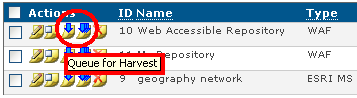
- The Geoportal Administrator reviews the repository and queues it for harvest. To queue a repository for harvest, he/she logs in to the Geoportal, selects the Repositories tab, and then clicks either the "Queue for Harvest" or "Queue for Full Harvest" arrow next to the repository, as shown below. A regular harvest will harvest records that have been updated since the last time the repository was harvested. A full harvest harvests all records from that repository, even if they haven't been updated since the last automatic harvest.
- The Harvesting Service "wakes up" at the time interval specified during its configuration. At this time, the Harvesting Service pings the Geoportal to receive the list of repositories that have been queued for harvesting and that should be harvested according to the harvest frequency specified by the Publisher user who registered the repository.
- The Harvesting Service calls the Harvesting Tool to harvest those repositories according to the parameters set in the HarvestConfig.xml file.
- The queued repositories are harvested. If the HarvestConfig.xml file specified that they be published to the Geoportal, they are published and the Geoportal Administrator must approve them before they can be discovered through the search interface.
A Note about Harvesting Frequency
A Publisher user specifies the frequency for harvesting (Once every month, Twice every month, Once every week, Once a day, Once a hour, Only once) when he/she registers the repository on the Manage Repositories page. When the Harvesting Service queries the list of repositories to see which ones are eligible to be harvested, it will see new repositories and harvest them. That gives the repository a date/timestamp, and the repository becomes eligible for harvesting again when the frequency specified (for example, Once every week) has passed.
Because running a harvesting job can take time (varying from seconds to a full day, depending on the repository and number of records), it is possible that even a repository that is eligible may not be harvested that same day since other jobs may be ahead of it in the queue. When it is harvested, it is given a new last-harvested date/timestamp and will become eligible again at the frequency specified.
So the frequency set on the Manage Repositories page is a relative timeframe. For example, repositories scheduled for a weekly harvest will not be harvested sooner than the week, but could be harvested a little after the week has passed.


