Customize Search Results with a 'Share' Link for Sharing Records


Customize Search Results with a 'Share' Link for Sharing Records |
|
| Release 9.3.1 |
|
This customization enables a 'Share' link for each metadata record that appears in the search results page. The Share link allows users to bookmark (i.e., Add to Favorites) or share (i.e., through Digg, MySpace, Google, etc.) a particular metadata record directly from the search results page using technology from AddThis.
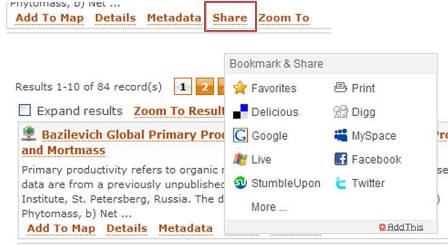
Follow the steps below to add the 'Share' link to the Geoportal Implementation. To perform this customization, access to the Geoportal .jsp files on the Geoportal web application server is necessary.
<script type="text/javascript" src="http://s7.addthis.com/js/200/addthis_widget.js">
<script type="text/javascript">
                var addthis_pub=" ";
</script>
<% // Share result %>
<h:outputLink id="_lnkShare" rendered="#{record.viewMetadataUrl != ''}"
               value="http://www.addthis.com/bookmark.php?v=20" styleClass="resultsLink"                onmouseover="return addthis_open(this, '', '#{record.viewMetadataUrl}', '#{record.title}')"onmouseout="addthis_close()" onclick="return addthis_sendto()">
                <h:outputText id="_txtShareThis" value="#{gptMsg['catalog.search.searchResult.share']}" />
</h:outputLink>
catalog.search.searchResult.share = Share