Toolboxes in geodatabases in SQL Server
Toolboxes in geodatabases in SQL Server
|
| Release 9.3 |
   |
In ArcCatalog, you can create new toolboxes in your geodatabase by right-clicking the geodatabase in the ArcCatalog tree, pointing to New, and clicking Toolbox.
NOTE: Once created, you should add the toolbox to ArcToolbox; if it isn't in ArcToolbox, you can't access it in the command line window. For information on how to create a toolbox or how to add a toolbox, see Basic toolbox management.
If you drag and drop or add your toolbox to ArcToolbox, the toolbox also remains in your geodatabase.
Tooboxes in ArcCatalog
In the Catalog tree, toolboxes show up in the geodatabase looking like the following:

Toolboxes in a SQL Server DBMS
Only two tables are needed to represent toolboxes in a DBMS: a business table to store information about the tools in the toolbox and a system table—GDB_TOOLBOXES—to keep track of the toolboxes. The following are the tables for the MoveData toolbox:
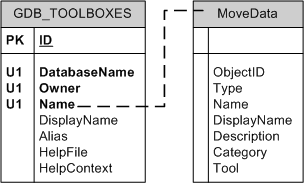 These two tables are associated by the Name—the value in the Name field of the GDB_TOOLBOXES table corresponds to the business table name. This is an implicit relationship, as denoted by the dashed line.
As indicated by the names in parentheses following the table names, the GDB_TOOLBOXES resides in the ArcSDE administrator's schema (sde) and the business table resides in the user's schema (RJP). The GDB_TOOLBOXES table is created when you create the geodatabase; the business table doesn't get created until you create the toolbox.
For a definition of the GDB_TOOLBOXES table, see System tables of a geodatabase in SQL Server.
The following is the definition for a toolbox business table:
These two tables are associated by the Name—the value in the Name field of the GDB_TOOLBOXES table corresponds to the business table name. This is an implicit relationship, as denoted by the dashed line.
As indicated by the names in parentheses following the table names, the GDB_TOOLBOXES resides in the ArcSDE administrator's schema (sde) and the business table resides in the user's schema (RJP). The GDB_TOOLBOXES table is created when you create the geodatabase; the business table doesn't get created until you create the toolbox.
For a definition of the GDB_TOOLBOXES table, see System tables of a geodatabase in SQL Server.
The following is the definition for a toolbox business table:
| Field name |
Field type |
Description |
|---|
| OBJECTID |
int |
Unique ID of the tool |
| Type |
smallint |
Code that indicates the type of tool
1 = function tool
2 = model tool
3 = script tool
4 = custom tool |
| Name |
nvarchar(255) |
Name of the tool |
| DisplayName |
nvarchar(255) |
The label for the tool |
| Description |
nvarchar(255) |
Description of the tool
Nulls allowed |
| Category |
nvarchar(255) |
Name of the toolset in which tools are grouped; includes the path to the toolset if it is a toolset nested inside another toolset
Nulls allowed |
| Tool |
image |
All other properties of the tool
Nulls allowed |
Toolboxes in an XML document
Toolboxes are data elements and, therefore, will be prefaced with a DataElement tag. The data element type will be esri.DEToolbox.
The following is the XML (including metadata) for a toolbox named MoveData:
<DataElement xsi:type="esri:DEToolbox">
  <CatalogPath>/V=dbo.DEFAULT/TB=bu_42606.DBO.MoveData</CatalogPath>
  <Name>bu_42606.DBO.MoveData</Name>
  <MetadataRetrieved>true</MetadataRetrieved>
 <Metadata xsi:type="esri:XmlPropertySet">
  <XmlDoc><?xml version="1.0"?> <metadata xml:lang="en"><Esri><MetaID>{AE214421-4877-4FEB-96A5-8668EBAA9326}</MetaID><CreaDate>20060426</CreaDate><CreaTime>11473700</CreaTime><SyncOnce>TRUE</SyncOnce><ModDate>20060426</ModDate><ModTime>114737</ModTime></Esri><toolbox name="bu_42606.DBO.MoveData" alias=""><arcToolboxHelpPath>C:\Program Files\ArcGIS\Help\gp</arcToolboxHelpPath><toolsets/></toolbox><dataIdInfo><idCitation><resTitle>bu_42606.DBO.MoveData</resTitle></idCitation></dataIdInfo><distInfo><distributor><distorFormat><formatName>ArcToolbox Toolbox</formatName></distorFormat></distributor></distInfo></metadata></XmlDoc>
  </Metadata>
  <DatasetType>esriDTToolbox</DatasetType>
  <DSID>-1</DSID>
  <Versioned>false</Versioned>
  <CanVersion>false</CanVersion>
</DataElement>
