How to Use Search Page Results
After submitting search criteria on the Search Page, a list of matching records are returned. Each record has a number of options associated with it, which are explained below. The REST API options for the search also appear on the search results page, at the bottom. Registered users have the option of saving the search criteria so the search can be loaded again quickly in the future by clicking the "My Saved Searches" link and naming the search (default limit for saved searches is 10 per user).
Each returned record has options associated with it. Doubleclick the metadata record to expand its information section and see the options.
-
Open: launches a new window displaying the website for the metadata itself, the organization that published the metadata, or the downloadable data resource (if an ftp, zip, or other downloadable file was referenced in the metadata). If such information is not defined in the metadata's XML, then this link will not appear.
-
Preview: launches the Previewer, a simple viewing interface that enables users to preview live data such as WMS or ArcGIS Server services. If the metadata is not recognized as live data or a service URL is not defined, the Preview link will still open the Previewer, and instead of showing the live data map, the organization's website will display if provided in the metadata.
-
Website: launches a new window displaying a website for the metadata itself or the organization that published the metadata, in addition to the site opened with the "Open" link described above (if generated). If no website is defined in the metadata's XML, then this link will not appear.
-
Details: loads the record's basic information into an easily readable interface. Information that is usually returned in the Details is the metadata record's title, publisher/originator, geographic extent, and abstract. Other information displayed is determined by the standard that the metadata record follows, and whether the metadata describes a map service. For example, a record that follows the FGDC standard may show different information in the view details page than a record that follows the ISO 19139/19115 Dataset standard. A record describing a map service will also show the service on a map on the Details page.
Note
: a details link will not be displayed for search results returned from a Directed Search.
-
Metadata: loads the metadata record's raw XML into a new window on the web browser.
-
Zoom To: zooms to the spatial extent of the metadata in the search results footprint map.
-
Thumbnails: graphic defined in the "Browse Graphic" portion of the metadata record's XML, and displayed as an image in the search results. If a browse graphic has not been defined in the XML, then the thumbnail will not be displayed. If a thumbnail is displayed but there is a red "X" where the image should be, then the link defined in the metadata XML is either not accessible to the Geoportal or is broken.
Result Icons and Footprints
- A Result Icon showing what type of data resource the metadata describes is shown next to the record's name. Below is a table showing each icon and its resource type. Note that 'contentType' is a metadata element created by ESRI to help classify metadata documents for use in ESRI software. Most metadata standards do not implement a 'contentType' element; therefore, the Geoportal extension uses information within metadata documents to attempt to assign a content type value to records. If it cannot find information to assign a resource type, it will assign the document to the "Resource Undetermined" category.
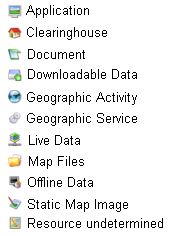
-
Search Result Footprints: For each record in the search results, a footprint of that record's spatial extent is shown in the search results footprint map. As you scroll over the footprints in that map, the corresponding metadata record for that footprint will be highlighted in the search results list. Conversely, if you scroll over a particular record in the list of search results, its spatial extent will be highlighted in yellow on the map.
REST API links at the Bottom of the Page
At the bottom of the search result page, there are six options (GEORSS, ATOM, HTML, FRAGMENT, KML, and JSON) that enable users to see the search results through the REST API. To learn about the REST API functionality and how to leverage it for your organization, see the section on the
REST API.


