Feature datasets in a geodatabase in DB2
Feature datasets in a geodatabase in DB2
|
| Release 9.3 |
   |
Feature datasets are objects that allow you to group together related feature classes.
You would use a feature dataset to group feature classes that
- Are stored in the same coordinate system
- Participate in a topology
- Are part of a geometric network, network dataset, or terrain dataset
Feature datasets contain feature classes as well as topologies, relationship classes, feature linked annotation, geometric networks, network datasets, schematics, terrains, and cadastral fabrics. In the train depot and railroad track example presented in the feature class topic, you could group these two related feature classes together by placing them in the same dataset. You could subsequently create a topology to define how these two feature classes interact.
Use the following links to read about different components of feature datasets in DB2:
The following describes how a feature dataset would appear in ArcCatalog, in a DB2 DBMS, and in an XML document.
Feature datasets in ArcCatalog
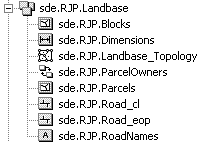
In the Catalog tree, feature datasets look like the following:
 This feature dataset is named Landbase, is owned by user RJP, and resides in a database called sde.
When the feature dataset is expanded in the Catalog tree, you can see all the feature classes and other data objects that are in it.
This feature dataset is named Landbase, is owned by user RJP, and resides in a database called sde.
When the feature dataset is expanded in the Catalog tree, you can see all the feature classes and other data objects that are in it.
Feature datasets in a DB2 DBMS
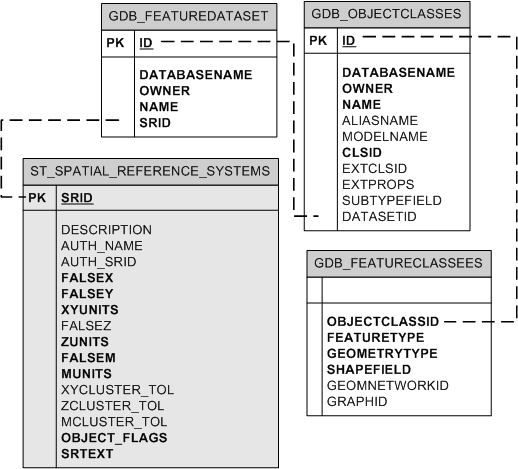
In the database, feature datasets are virtual collections of feature classes. They are grouped together by a common dataset ID, which is maintained in the GDB_FEATUREDATASET system table and associated with the GDB_OBJECTCLASSES system table.
For the Landbase feature dataset example, the feature class Parcels would be linked to the Landbase feature dataset through the GDB_OBJECTCLASSES table. The ST_SPATIAL_REFERENCE_SYSTEMS table is a view and is shown in gray to differentiate. Dashed lines indicate implicit relationships between columns.
 Because feature datasets are a virtual collection of objects, feature classes in feature datasets are just like stand-alone feature classes in that they have their own records in the GDB_FEATURECLASSES table and all the other tables associated with feature classes (such as LAYERS, TABLE_REGISTRY, GEOMETRY_COLUMNS, COLUMN_REGISTRY, and GDB_OBJECT_CLASSES). Since feature classes associated with feature datasets are database objects in their own right, they cannot have the same name as other tables or stand-alone feature classes in the same schema in the database.
Topologies, geometric networks, network datasets, and terrain datasets utilize additional system tables. These are described in separate topics.
Because feature datasets are a virtual collection of objects, feature classes in feature datasets are just like stand-alone feature classes in that they have their own records in the GDB_FEATURECLASSES table and all the other tables associated with feature classes (such as LAYERS, TABLE_REGISTRY, GEOMETRY_COLUMNS, COLUMN_REGISTRY, and GDB_OBJECT_CLASSES). Since feature classes associated with feature datasets are database objects in their own right, they cannot have the same name as other tables or stand-alone feature classes in the same schema in the database.
Topologies, geometric networks, network datasets, and terrain datasets utilize additional system tables. These are described in separate topics.
Feature datasets in an XML document
Feature datasets are grouped under the DatasetDefinitions tag in an XML document and separated by a DataElement tag of type FeatureDataset. The XML document entry for the Landbase dataset would look like the following:
<DatasetDefinitions xsi: type="esri:ArrayOfDataElement">
 <DataElement xsi:type="esri:DEFeatureDataset">
  <CatalogPath>/V=sde.DEFAULT/FD=sde.RJP.Landbase</CatalogPath>
  <Name>sde.RJP.Landbase</Name>
  <MetadataRetrieved>false</MetadataRetrieved>
  <DatasetType>esriDTFeatureDataset</DatasetType>
  <DSID>-1</DSID>
  <Versioned>true</Versioned>
  <CanVersion>true</CanVersion>
<Extent xsi:type="esri:EnvelopeN">
     <XMin>503924.656249088</XMin>
     <YMin>680110.56250334</YMin>
     <XMax>512514.562497088</XMax>
     <YMax>689084.187511697</YMax>
<SpatialReference xsi:type="esri:ProjectedCoordinateSystem">
  <WKT>PROJCS["NAD_1927_StatePlane_Alabama_East_FIPS_0101",GEOGCS["GCS_North_American_1927",DATUM["D_North_American_1927",SPHEROID["Clarke_1866",6378206.4,294.9786982]],PRIMEM["Greenwich",0.0],UNIT["Degree",0.0174532925199433]],PROJECTION["Transverse_Mercator"],PARAMETER["False_Easting",500000.0],PARAMETER["False_Northing",0.0],PARAMETER["Central_Meridian",-85.83333333333333],PARAMETER["Scale_Factor",0.99996],PARAMETER["Latitude_Of_Origin",30.5],UNIT["Foot_US",0.3048006096012192]]</WKT>
     <XOrigin>489871.255812</XOrigin>
     <YOrigin>665787.099562</YOrigin>
     <XYScale>499999.999534338</XYScale>
     <ZOrigin>0</ZOrigin>
     <ZScale>8192</ZScale>
     <MOrigin>0</MOrigin>
     <MScale>8192</MScale>
     <XYTolerance>6.56166666666667E-04</XYTolerance>
     <ZTolerance>2</ZTolerance>
     <MTolerance>2</MTolerance>
     <HighPrecision>true</HighPrecision>
   </SpatialReference>
  </Extent>
<SpatialReference xsi:type="esri:ProjectedCoordinateSystem">
  <WKT>PROJCS["NAD_1927_StatePlane_Alabama_East_FIPS_0101",GEOGCS["GCS_North_American_1927",DATUM["D_North_American_1927",SPHEROID["Clarke_1866",6378206.4,294.9786982]],PRIMEM["Greenwich",0.0],UNIT["Degree",0.0174532925199433]],PROJECTION["Transverse_Mercator"],PARAMETER["False_Easting",500000.0],PARAMETER["False_Northing",0.0],PARAMETER["Central_Meridian",-85.83333333333333],PARAMETER["Scale_Factor",0.99996],PARAMETER["Latitude_Of_Origin",30.5],UNIT["Foot_US",0.3048006096012192]]</WKT>
     <XOrigin>489871.255812</XOrigin>
     <YOrigin>665787.099562</YOrigin>
     <XYScale>499999.999534338</XYScale>
     <ZOrigin>0</ZOrigin>
     <ZScale>8192</ZScale>
     <MOrigin>0</MOrigin>
     <MScale>8192</MScale>
     <XYTolerance>6.56166666666667E-04</XYTolerance>
     <ZTolerance>2</ZTolerance>
     <MTolerance>2</MTolerance>
     <HighPrecision>true</HighPrecision>
    </SpatialReference>
   </DataElement>
.
...all other DataElements...
.
</DatasetDefinitions>
Top of page
