How to Use the Harvesting Tool
Instructions for installing the Harvesting Tool are provided in the Geoportal Extension 9.3.1 Installation Guide.
Three important concepts to understand when using the Harvesting Tool are:
Harvesting Protocols
The Geoportal extension Harvesting Tool supports harvesting from five different types of metadata repositories. Each type is referred to as a "protocol", and has certain parameters that are mandatory for the harvest to be successful. Additionally, there are optional parameters that help refine the harvest request. This section describes how to initiate simple harvesting requests against the five types of metadata repositories. If another organization wants to harvest your 9.3.1 sp1 geoportal with the Geoportal extension Harvesting Tool, you will be providing them with the CS-W url and the CS-W profile information. See Connection information for other geoportals to harvest yours.
The five protocols are ESRI Metadata Services (ESRI MS), Z39.50, Open Archives Initiative (OAI-PMH), Web Accessible Folders (WAF), and Catalog Service for the Web (CSW). For each of these five protocols you must specify certain parameters. If you fail to do so, the harvest will fail. The required and optional fields are described below for each protocol.

-
ESRI MS
-
Supported Versions:
ArcIMS versions 4.0.1, 9.0, 9.1, 9.2 and 9.3, and GPT 9.3 and Geoportal extension 9.3.1 (if the optional Metadata Server is implemented).
-
Required Fields
-
URL/Host: the URL of the server that hosts the metadata repository or clearinghouse.
-
Metadata Service: name of the metadata service to be harvested - e.g. GPT_Browse_Metadata
-
Optional Fields
-
Max Documents to Harvest: the maximum number of documents that will be harvested. If left blank, every document in the repository will be harvested, assuming no other criteria have been set
-
From/Until Date: date range can be used to harvest metadata records that have been updated or created in a specified period. Specifying only the "from" date, implies an "until" date of today
-
User/Password: only required when you harvesting from secure services
-
Root Folder: if you want to harvest only from a certain publisher's folder, indicate which folder here
-
Z39.50
-
Supported Versions:
XML and SGML
-
Required Fields
-
URL/Host: URL of the server that hosts the Z39.50 service - not Http, because you are using the Z39.50 protocol.
-
Port: port number on which the Z39.50 service runs
-
Database Name: name of the Z39.50 database holding the records to be harvested
-
Optional Fields
-
Max Documents to Harvest: the maximum number of documents that will be harvested. If left blank, every document in the repository will be harvested, assuming no other criteria have been set
-
From/Until Date: date range can be used to harvest metadata records that have been updated or created in a specified period. Specifying only the "from" date, implies an "until" date of today
-
SGML: Check this box if the Z39.50 repository is SGML enabled.
-
NOTE: If you will be harvesting from a Z39.50 repository, you must first install a third-party software component called ZMARCO. ZMARCO is a downloadable tool available from http://zmarco.sourceforge.net/ . Download ZMARCO to your machine, unzip the downloaded file, and double-click setup.exe to start the installation. When the installer asks to replace or keep a newer version of an existing file, choose to keep the newer version.
-
Open Archives Initiative (OAI)
-
Required Fields
-
URL/Host: URL of the server that host the metadata repository or clearinghouse
-
OAI Set: name of the set or database from which you want to harvest
-
OAI Meta Prefix: prefix of the metadata records stored in the OAI database that you want to harvest
-
Optional Fields
-
Max Documents to Harvest: the maximum number of documents that will be harvested. If left blank, every document in the repository will be harvested, assuming no other criteria have been set
-
From/Until Date: date range can be used to harvest metadata records that have been updated or created in a specified period. Specifying only the "from" date, implies an "until" date of today
-
Web Accessible Folders (WAF)
-
Required Fields
-
URL/Host: URL to the web accessible folder that contains the metadata records
-
Optional Fields
-
Max Documents to Harvest: the maximum number of documents that will be harvested. If left blank, every document in the repository will be harvested, assuming no other criteria have been set
-
From/Until Date: date range can be used to harvest metadata records that have been updated or created in a specified period. Specifying only the "from" date, implies an "until" date of today
-
User/Password: username and password that provides access to the folder. This is only required if the folder is secure
-
Including Subfolders: Check this box if harvesting from a folder that has sub-folders, and those sub-folders should also be harvested
-
Catalog Services for the Web (CSW)
-
Required Fields
-
URL/Host: URL of the server that host the CSW metadata repository or clearinghouse
-
CSW Profile: CSW profile of the repository being harvested. Supported profiles are:
- ArcGIS Server Geoportal Extension
- ArcIMS 9.1 CSW 2.0.0 OGCCORE
- ArcIMS 9.2 CSW 2.0.0 OGCCORE
- ArcIMS 9.2 CSW 2.0.1 ebRIM
- ArcIMS 9.2 CSW 2.0.1 OGCCORE
- ArcIMS 9.2 Post Service Pack 2 CSW 2.0.0 OGCCORE
- ArcIMS 9.2 Post Service Pack 2 CSW 2.0.1 OGCCORE
- ArcIMS 9.3 CSW 2.0.2 OGCCORE
- Compusult CSW 2.0.1 EBRIM
- Compusult WES9 CSW 2.0.0 OGCCORE
- CSW 2.0.2 AP ISO
- EXCAT CSW 2.0.2 OGCCORE
- GeoNetwork CSW 2.0.1 EBRIM
- GeoNetwork CSW 2.0.1 OGCCORE
- GeoNetwork CSW 2.0.2 APISO
- INSPIRE CSW 2.0.2 AP ISO
- IONIC CSW 2.0.0 ebRIM
- NASA CSW 2.0.2 APISO
- OWS-6 CSW 2.0.2 ebRIM
- SRU CSW 2.0.2 Gateway to Z39.50
- terra catalog CSW 2.0.2 AP ISO
-
Optional Fields
-
Max Documents to Harvest: the maximum number of documents that will be harvested. If left blank, every document in the repository will be harvested, assuming no other criteria have been set
-
From/Until Date:
date range can be used to harvest metadata records that have been updated or created in a specified period. Specifying only the "from" date, implies an "until" date of today
Publish through the Harvesting Tool
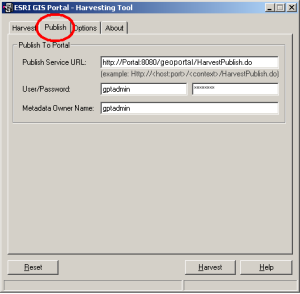
The Harvesting Tool connects to Geoportals using information that a user provides through the Harvesting Tool's 'Publish' tab. The Harvesting Tool connects through the Portal's Publish Metadata service. Connections enable the Harvesting Tool to publish harvested records to the Geoportal, and also ping the Geoportal database to retrieve registered repository information. This section describes parameters on the Publish and Options tab with which users should become familiar.
-
Input Fields for the Publish Tab
-
Publish Service URL: URL to the Portal Server, e.g. "http://<Geoportal9.3.1_ServerName>[:port]/Geoportal9.3.1_Application_Name/HarvestPublish.do"
-
User/Password: user name and password for an administrator or publisher account registered in the GIS Portal
-
Metadata Owner Name: used when performing a publish operation. The name of the user who will own the published metadata. If you load a repository using the "Configure from DB" dialog on the Option tab, this will populate with the metadata owner associated with the repository when it was registered.
NOTE: If this parameter points to a different user than the user whose account information is specified in the user/password fields, the user specified in "Metadata Owner Name" takes precedence on metadata ownership.
-
Input Fields for the Options Tab
-
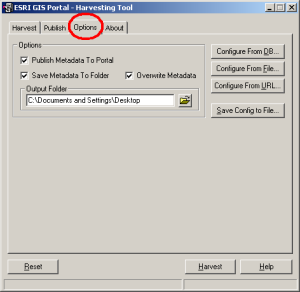
Publish Metadata To Portal: Checking this option specified the user's intent for harvested metadata to be automatically published to the Geoportal. If this option is checked, then it is required for all of the fields on the "Publish" tab to be populated.
-
Save Metadata to Folder: By checking this option, harvested records will be written to a specified folder. When this option is checked, two new settings appear:
-
Overwrite Metadata: Check this box if you want to overwrite any metadata records that already exist in the specified Output Folder
-
Output Folder: the folder in which the harvested metadata records should be saved
-
Configure From DB: Opens the "Load Configuration from Database" dialog, retrieving a list of metadata repositories that have been registered in the Geooortal database. The Publish Service URL and User/Password fields on the "Publish" tab must be populated for this connection to be successful. Once the dialog has loaded, select a repository from the list and click the Load button. The repository settings, as they are stored in the Geoportal database, will automatically populate on the Harvest tab.
-
Configure from File: Allows the user to configure a harvesting session from information stored in an XML file local to the machine where the Harvesting Tool is installed. The file can be created using the Save Config to File button, and will load settings for the Harvest, Publish, and Options tabs.
-
Configure from URL: Allows the user to configure a harvesting session from information stored in an XML file available on a web server. The file is the same as the one created with the Save Config to File button, but is exposed on the web instead of saved locally.
-
Save Config to File: Saves the current Harvest, Publish and Option settings to an XML file that can be used in a new harvest session with the Configure from File or the Configure from URL option.