What's New in Geoportal Extension 9.3.1, service pack 1
The Geoportal extension 9.3.1 sp1 provides a number of enhancements and new functionality, while addressing issues from the Geoportal extension 9.3.1 release. For specific information on issues resolved with sp1, see the Release Notes file on the service pack 1 installation DVD.
This section describes what's new for Geoportal extension 9.3.1 sp1:
Expanded Platform Support
With service pack 1, the Geoportal extension was tested in additional software environments. These are highlighted below. To see the complete list of supported system requirements, see Pre-installation Requirements:
-
Operating System
- Windows 2008 Server Standard 64-bit
-
Servlet Container
-
Browser Support
-
ESRI Software
- ArcGIS Server Enterprise Standard 9.3.1, service pack 1
- ArcGIS Desktop 9.3.1, service pack 1
- ArcGIS API for JavaScript version 1.5
Discovery Enhancements
Several enhancements have been implemented that enhance the user experience and increase the capabilities for discovering geospatial resources through the geoportal. The following sections describe exciting new features at service pack 1:
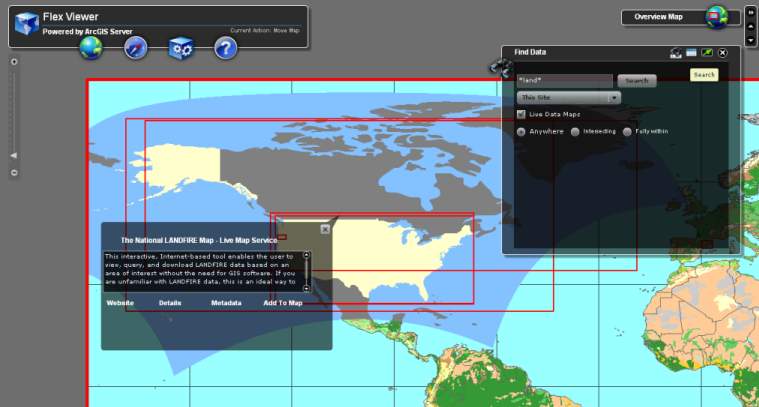
Search the Geoportal from a Flex-based mapping viewer
The Geoportal extension ships with a
sample Flex-based viewer preconfigured with a widget that allows for searching the geoportal from the viewer interface. For more information on using the Geoportal Search Widget for Flex, see
Introduction to Geoportal Widgets.
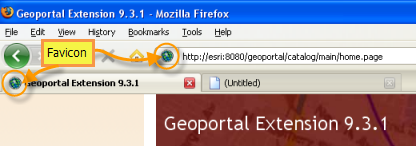
Favicon appears when geoportal web page is accessed
A favicon allows users to quickly distinguish the geoportal web page from other webpages in a list of favorites or tabs they may have open in a browser. It is possible to switch the favicon to one that better suits your organization. For details, see
Switch the Default Favicon.
Inline Preview Enhancements
At 9.3.1 sp1, the inline preview capability has been improved with several enhancements. The preview capability now supports the following:
- KMZ files
- Sensor Observations Services (Simple and Compound)
- Restricted Services
- Rendering a place mark inside a KML referenced as a NetworkLink
For more information on the inline preview capability, see
Inline Preview.
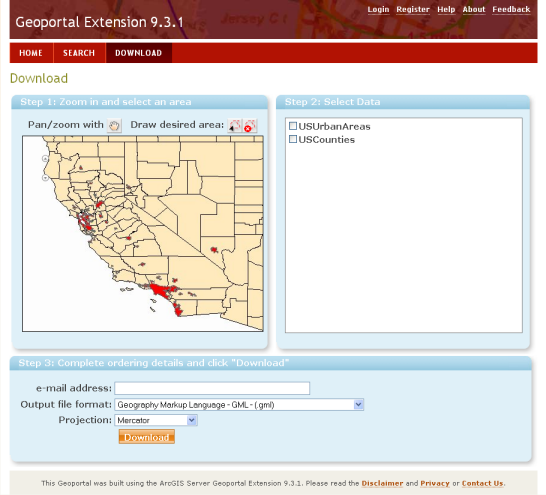
Updated Data Download Interface
The user interface on the data download page has been updated and provides a more user friendly experience. It offers three steps and walks the user through the process of downloading their area of interest in the format and projection in which they need it. For details, see
How to Use the Data Download Feature.
Improved Searching: Envelope and Timestamp Searches
The geoportal search page search text field now supports range searches for spatial envelopes or time periods. For details, see the Range Searches section in
Using Lucene Search Text Queries.
Publishing Enhancements
The Geoportal extension has also new features to simplify registration of metadata documents:
Interoperability Enhancements
The following interoperability enhancements have been made:
- Added Support for JSON as an output format of the REST search results on the geoportal search page. JSON is a lightweight, human-readable data interchange format. In the geoportal, the JSON output format appears at the bottom of the search results on the search page. It is possible to see the list of results in formatted JSON, called 'PJSON' by clicking the JSON link.
Expanded Documentation
For the Geoportal extension 9.3.1 sp1, we have continued to update our webhelp documentation. There are two versions of the WebHelp available:
Additionally,
Geoportal extension JavaDoc is now available online.


